
پرامپت هیرو سکشن اپلیکیشن مدیتیشن؛ فضای آرام برای اپ تمرکز و ذهنآگاهی
قیمت
رایگان
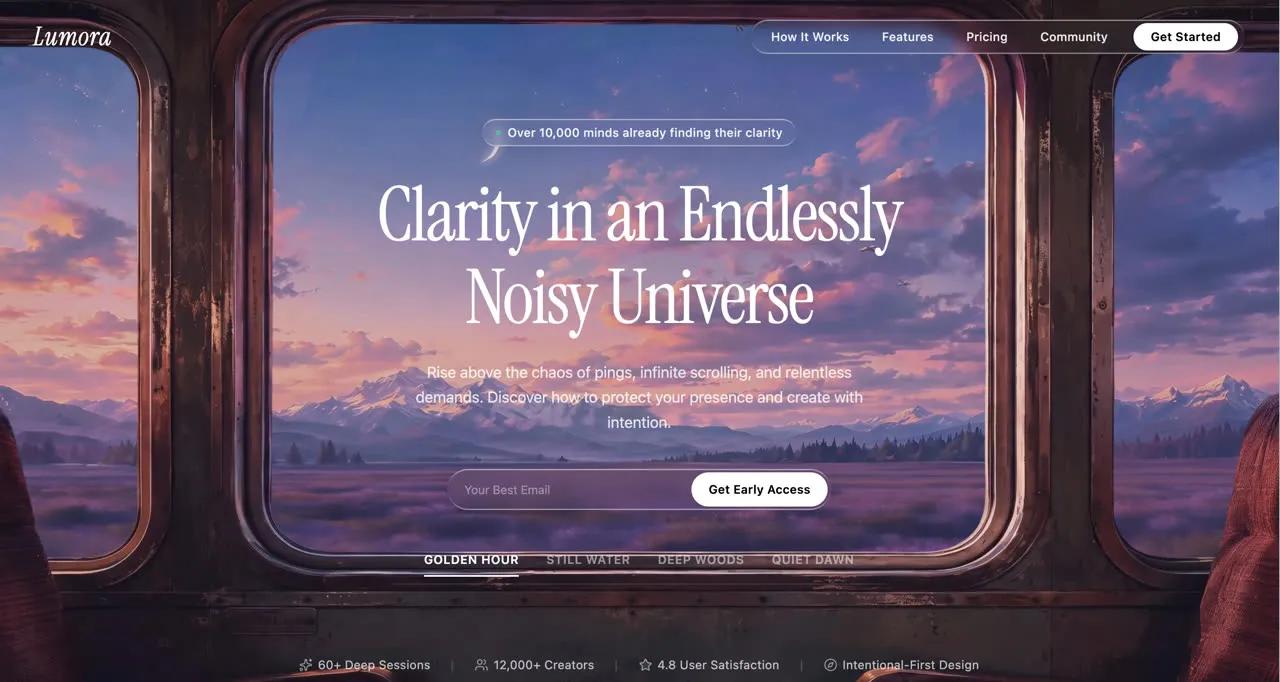
با این پرامپت هیرو سکشن اپلیکیشن مدیتیشن یک هیرو سکشن سینمایی تمامصفحه برای اپلیکیشن مدیتیشن و تمرکز با فونت Instrument Serif و ویدیوی آرام پسزمینه بسازید. پرامپت کامل را در v0، Lovable، Bolt یا Cursor بچسبانید و خروجی آماده بگیرید.
پرامپت هیرو سکشن اپلیکیشن مدیتیشن چه میسازد؟
این پرامپت هیرو سکشن اپلیکیشن مدیتیشن یک هیرو سکشن سینمایی تمامصفحه برای اپلیکیشن مدیتیشن و تمرکز با فونت Instrument Serif و ویدیوی آرام پسزمینه میسازد. نمونه داخل پرامپت برای برندی به نام «Lumora» نوشته شده و با React + Tailwind CSS + Lucide ساخته میشود. چون همه جزئیات (فونت، رنگ، فاصلهها و انیمیشنها) دقیق نوشته شده، خروجی ابزارهای هوش مصنوعی تا حد زیادی شبیه پیشنمایش بالای صفحه میشود.
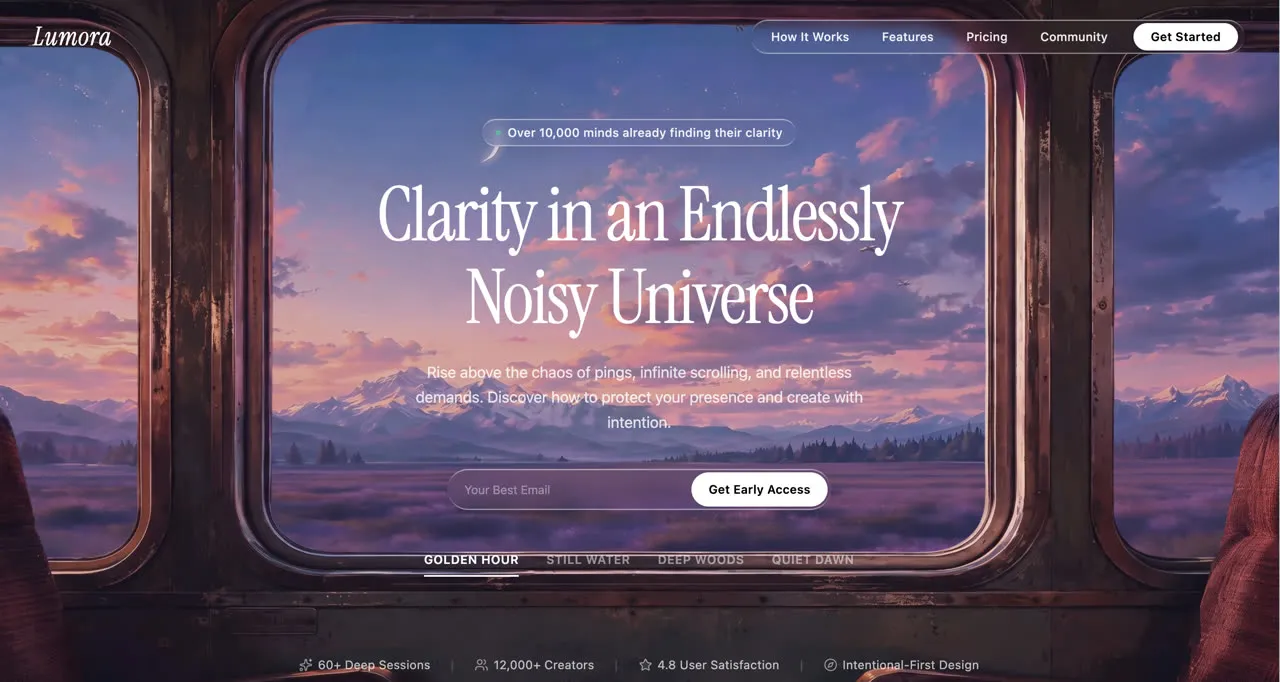
- لوگوی ایتالیک با Instrument Serif
- ویدیوی آرام و تیتر مینیمال
- مناسب اپهای سلامت روان و تمرکز
روش استفاده در v0، Lovable، Bolt و Cursor
- متن کامل پرامپت انگلیسی را کپی کنید؛ چیزی از آن را حذف نکنید.
- در v0، Lovable یا Bolt یک پروژه تازه بسازید و پرامپت را بچسبانید. در Cursor یا Claude Code، اول یک پروژه خالی Vite بسازید و بعد پرامپت را به ایجنت بدهید.
- نسخه اول را ببینید و فقط یک تغییر در هر پیام بخواهید؛ مثلاً «اسم برند را عوض کن» یا «رنگ دکمه را سبز کن».
- لینک ویدیو یا تصویر نمونه را با رسانه خودتان جایگزین کنید و نسخه موبایل را هم بررسی کنید.
نکتههای شخصیسازی
برای سایت فارسی، بعد از ساخت از ابزار بخواهید صفحه را راستچین کند و فونت Vazirmatn را جایگزین کند. تیتر و متن دکمهها را کوتاه نگه دارید تا چیدمان به هم نریزد. اگر ویدیوی پسزمینه سنگین است، آن را زیر ۳ مگابایت و با فرمت mp4 (H.264) فشرده کنید و یک تصویر پوستر هم بگذارید.
سوالات متداول
پرامپت هیرو سکشن اپلیکیشن مدیتیشن را در کدام ابزار استفاده کنم؟
این پرامپت برای ابزارهای ساخت سایت با هوش مصنوعی مثل v0، Lovable، Bolt، Cursor و Claude نوشته شده است. متن کامل را در یک گفتگوی تازه بچسبانید تا هیرو سکشن با React + Tailwind CSS + Lucide ساخته شود.
آیا میتوانم متنها را فارسی و راستچین کنم؟
بله. بعد از ساخت نسخه اول، از ابزار بخواهید dir="rtl" را روی html بگذارد، فونت را به Vazirmatn تغییر دهد و متنها را با محتوای برند شما جایگزین کند.
ویدیو یا تصویر داخل پرامپت را میتوانم استفاده کنم؟
لینکهای رسانه داخل پرامپت فقط برای نمونه هستند و مجوز MIT پرامپت شامل آنها نمیشود. برای سایت واقعی، ویدیو یا تصویر خودتان را جایگزین لینک کنید.
استفاده تجاری از این پرامپت آزاد است؟
متن پرامپت با مجوز MIT منتشر شده و استفاده، تغییر و استفاده تجاری آن آزاد است؛ فقط نام منبع (DexZane/awesome-web-prompts) را حفظ کنید.
پرامپتها و دستههای مرتبط
- پرامپت هیرو سکشن: همه پرامپتهای هیرو سکشن و لندینگ پیج
- پرامپت هیرو سکشن اپساز هوش مصنوعی
- پرامپت هیرو سکشن انیمیشن متن
- پرامپت وایب کدنویسی
- پرامپت طراحی وب
Prompt from DexZane/awesome-web-prompts (MIT License, © 2026 DexZane)
برای دیدن پرامپتهای بیشتر در همه دستهها به آرشیو پرامپت سر بزنید.
```
Create a fullscreen cinematic hero section for a mindfulness/focus app called "Lumora" using React, Tailwind CSS, and Lucide React icons.

## Font

Use **Instrument Serif** (Google Fonts, italic for the logo). Load it in index.html:
```
<link rel="preconnect" href="https://fonts.googleapis.com">
<link rel="preconnect" href="https://fonts.gstatic.com" crossorigin>
<link href="https://fonts.googleapis.com/css2?family=Instrument+Serif:ital@0;1&display=swap" rel="stylesheet">
```

Set `font-family: 'Instrument Serif', serif` on html/body. Use `system-ui, sans-serif` inline for body text (subtext, buttons, stats, video labels).

---

## Background Video Layer

Stack 4 fullscreen looping videos absolutely positioned. Only the active one has `opacity-100`; others have `opacity-0`. Transition opacity over 1000ms ease-in-out. Videos autoPlay, muted, loop, playsInline.

**Video URLs (in order):**
1. `https://d8j0ntlcm91z4.cloudfront.net/user_38xzZboKViGWJOttwIXH07lWA1P/hf_20260702_081127_0992a171-d3c6-4978-8213-0ec5df8b6d63.mp4`
2. `https://d8j0ntlcm91z4.cloudfront.net/user_38xzZboKViGWJOttwIXH07lWA1P/hf_20260702_092026_dd05b805-ea0f-40b2-8c52-332b88502592.mp4`
3. `https://d8j0ntlcm91z4.cloudfront.net/user_38xzZboKViGWJOttwIXH07lWA1P/hf_20260702_081042_df7202bf-bd80-4b2b-bbc6-1f09ba2870e9.mp4`
4. `https://d8j0ntlcm91z4.cloudfront.net/user_38xzZboKViGWJOttwIXH07lWA1P/hf_20260702_080959_4cac5234-3573-464e-a5b7-76b94b8a7d61.mp4`

**Labels:** Golden Hour, Still Water, Deep Woods, Quiet Dawn

---

## Transparent PNG Overlay (z-index 1)

Place this image over the videos as an absolutely positioned overlay covering the full viewport:
```
https://soft-zoom-63098134.figma.site/_assets/v11/0b4a435b2df2747593c43d7a1c9b4578f7d8d90c.png
```

Apply a continuous "train-bob" animation: translateY oscillates between 0 and -6px over 3s ease-in-out infinite, with a constant scale(1.03) to prevent edges from showing during the motion.

---

## Liquid Glass Effect (CSS class `.liquid-glass`)

```css
.liquid-glass {
  background: rgba(255, 255, 255, 0.01);
  background-blend-mode: luminosity;
  backdrop-filter: blur(4px);
  -webkit-backdrop-filter: blur(4px);
  border: none;
  box-shadow: inset 0 1px 1px rgba(255, 255, 255, 0.1);
  position: relative;
  overflow: hidden;
}
```

With a `::before` pseudo-element for a subtle gradient border:
```css
.liquid-glass::before {
  content: '';
  position: absolute;
  inset: 0;
  border-radius: inherit;
  padding: 1.4px;
  background: linear-gradient(180deg,
    rgba(255,255,255,0.45) 0%, rgba(255,255,255,0.15) 20%,
    rgba(255,255,255,0) 40%, rgba(255,255,255,0) 60%,
    rgba(255,255,255,0.15) 80%, rgba(255,255,255,0.45) 100%);
  -webkit-mask: linear-gradient(#fff 0 0) content-box, linear-gradient(#fff 0 0);
  -webkit-mask-composite: xor;
  mask-composite: exclude;
  pointer-events: none;
}
```

---

## Content Layer (z-index 2) - Flex Column Full Height

### Navigation (top)
- Left: "Lumora" in white, italic, text-xl (sm:text-2xl)
- Right (desktop md+): A `.liquid-glass` pill containing nav links ("How It Works", "Features", "Pricing", "Community") in white/90 text-sm with hover to white, plus a solid white "Get Started" button at the end
- Right (mobile): A `.liquid-glass` rounded hamburger button using Lucide `Menu`/`X` icons with a crossfade rotation animation (300ms). The Menu icon rotates out 90deg and scales to 75%; the X icon rotates in from -90deg

### Mobile Menu Overlay (fixed, z-50)
- Backdrop: `bg-black/60 backdrop-blur-sm`
- Centered fullscreen panel with staggered entrance (each link delays 50ms more: 100ms, 150ms, 200ms, 250ms, 300ms)
- Links: white text-3xl, translate-y-4 to 0 on open
- "Get Started" button at bottom with scale animation
- Cubic-bezier easing: `cubic-bezier(0.4,0,0.2,1)`, duration 500ms

### Hero Content (centered, below nav)
- **Badge**: `.liquid-glass` rounded-full pill with text "Over 10,000 minds already finding their clarity"
- **Heading**: "Clarity in an Endlessly / Noisy Universe" (line break after "Endlessly"). Sizes: text-4xl / sm:text-5xl / md:text-7xl / lg:text-[5.5rem], leading-[1.1], max-w-4xl
- **Subtext**: "Rise above the chaos of pings, infinite scrolling, and relentless demands. Discover how to protect your presence and create with intention." max-w-xl, leading-relaxed
- **Email Input**: `.liquid-glass` rounded-full pill containing a text input ("Your Best Email") and a solid white "Get Early Access" button. Max-width 320px on mobile, sm:max-w-sm
- **Video Switcher**: Row of 4 text buttons with labels. Active button has solid color + bottom border. Inactive buttons are 50% opacity with transparent border, hover to 80%

### Dark Mode for "Deep Woods" (3rd video, index 2)
When the 3rd video is active, all hero content (badge, heading, subtext, input, video switcher) transitions to dark color `#182C41` with 700ms duration. The navbar and bottom stats remain white always.

### Bottom Stats (pushed to bottom via flex-1 spacer)
- Row of stats separated by `|` dividers (hidden on mobile): "60+ Deep Sessions", "12,000+ Creators", "4.8 User Satisfaction", "Intentional-First Design"
- text-white/70, text-xs sm:text-sm, system-ui font

---

## Video Switching Logic
- Track `activeVideo` state (default 0) and `isTransitioning` boolean
- On click, if not already active and not mid-transition, set new active video and start a 1000ms cooldown (matching the CSS crossfade duration)
- During cooldown, ignore additional clicks

---

## Responsive Behavior
- Mobile: Smaller text sizes, tighter padding, hamburger nav, stats wrap naturally
- Tablet/Desktop: Larger heading, more padding, inline nav pill, stats with pipe separators

---

## Section Container
```html
<section className="relative w-full h-screen overflow-hidden bg-black">
```

Black background prevents flash before videos load. Everything is a single viewport-height section with no scroll.

---

That's the complete specification. The entire app lives in a single `App.tsx` component with the CSS in `index.css`.
```پرامپتهای مرتبط
مقالات مرتبط
مهندسی پرامپت
شخصیسازی پرامپت آماده؛ راهنمای گامبهگام برای گرفتن جواب حرفهای
پرامپت آماده فقط نقطه شروع است. در این راهنما یاد میگیرید با پنج لایه شخصیسازی، قالبهای عمومی را به پرامپتهایی تبدیل کنید که خروجی مخصوص کسبوکار شما میدهند.
۱۴۰۵/۸/۱۴
توسعه و برنامهنویسی
مدلهای هوش مصنوعی چینی ۲۰۲۶؛ Kimi K3، GLM-5.3، Wan3.0 و MiniMax H3
مرور تازهترین مدلهای هوش مصنوعی چینی بر اساس صفحات رسمی: Kimi K3 و K2.8 Preview، GLM-5.3، Wan3.0 و MiniMax H3؛ و اینکه برای کاربر ایرانی چه معنایی دارند.
۱۴۰۵/۸/۱۳
توسعه و برنامهنویسی
کلود اپوس ۵.۵؛ قویترین مدل Anthropic برای برنامهنویسی و پروژههای بزرگ
Anthropic در ۲۲ سپتامبر ۲۰۲۶ Claude Opus 5.5 را با عملکرد پیشرو در کدنویسی ایجنتی و ۴۰ درصد هزینه کمتر از Opus 5 معرفی کرد. راهنمای کامل برای برنامهنویسان.
۱۴۰۵/۸/۱۲
مهندسی پرامپت
ابزار هوش مصنوعی رایگان برای فارسیزبانها در ۲۰۲۶؛ چه چیزی واقعاً رایگان است؟
کدام ابزار هوش مصنوعی رایگان واقعاً به درد کار روزمره میخورد؟ راهنمای پلنهای رایگان ChatGPT، Claude و DeepSeek، مدلهای متنباز و ۷ ترفند برای استفاده بهتر.
۱۴۰۵/۸/۱۱
امتیاز و نظرات
— · 0 امتیاز
امتیاز شما