
پرامپت هیرو سکشن فضایی؛ سحابی و فضا در یک فایل HTML
قیمت
رایگان
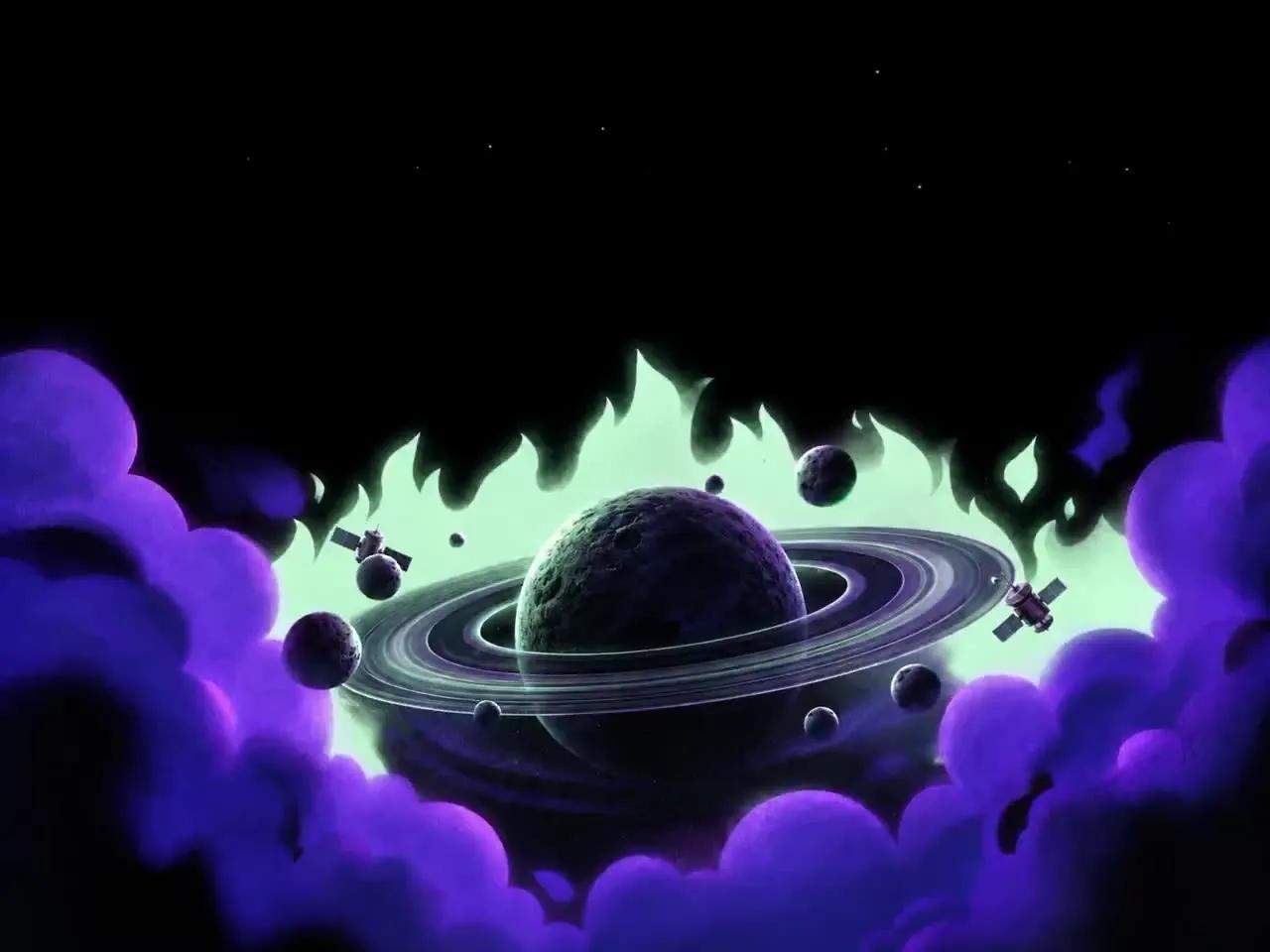
با این پرامپت هیرو سکشن فضایی یک هیرو سکشن تمامصفحه و بدون اسکرول برای محصول فضایی خیالی با ویدیوی سحابی در پسزمینه، در یک فایل HTML بسازید. پرامپت کامل را در v0، Lovable، Bolt یا Cursor بچسبانید و خروجی آماده بگیرید.
پرامپت هیرو سکشن فضایی چه میسازد؟
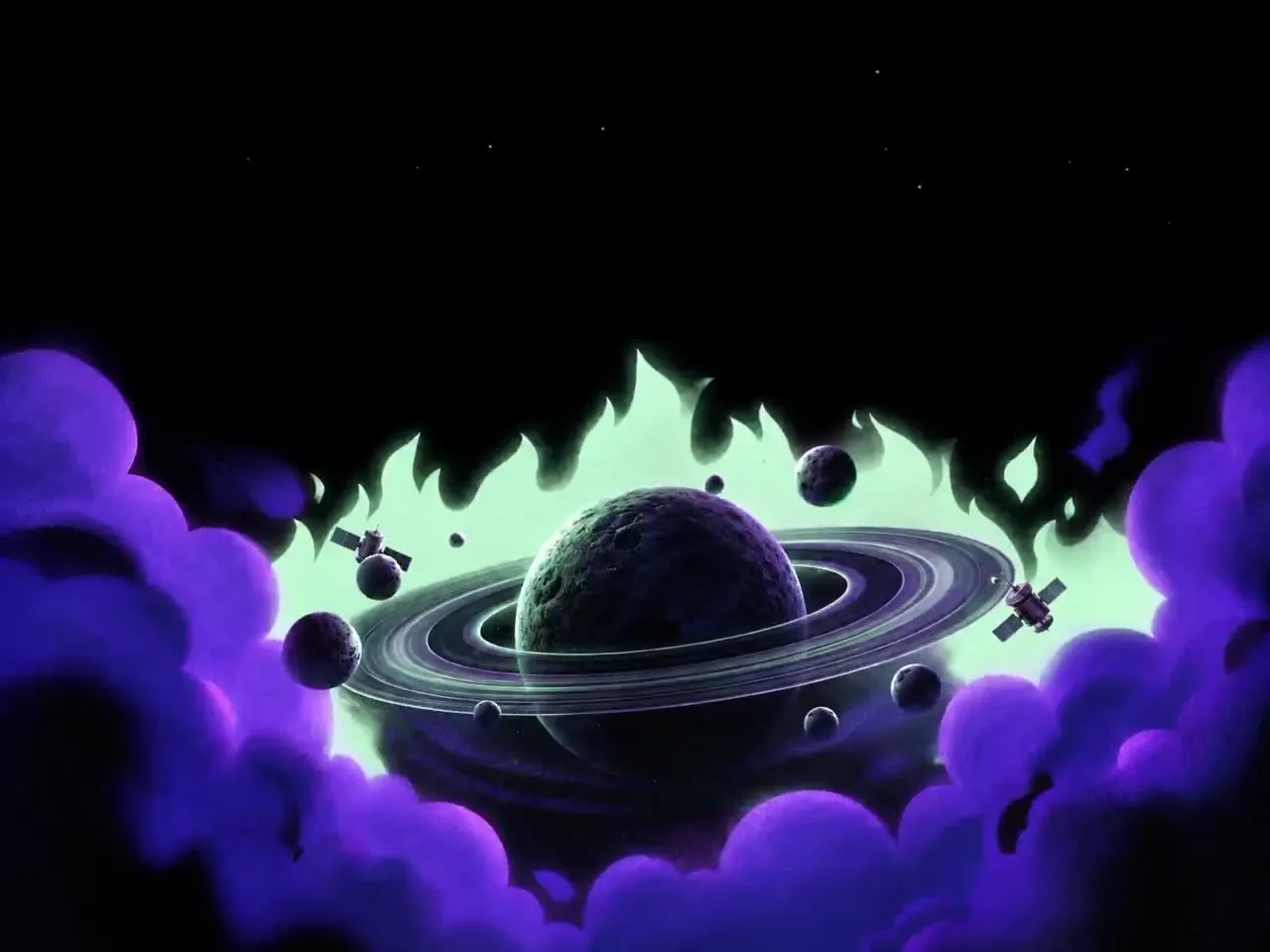
این پرامپت هیرو سکشن فضایی یک هیرو سکشن تمامصفحه و بدون اسکرول برای محصول فضایی خیالی با ویدیوی سحابی در پسزمینه، در یک فایل HTML میسازد. نمونه داخل پرامپت برای برندی به نام «Orbit» نوشته شده و با HTML + CSS + JavaScript داخلی (بدون فریمورک) ساخته میشود. چون همه جزئیات (فونت، رنگ، فاصلهها و انیمیشنها) دقیق نوشته شده، خروجی ابزارهای هوش مصنوعی تا حد زیادی شبیه پیشنمایش بالای صفحه میشود.
- یک فایل index.html بدون مرحله build
- ویدیوی پسزمینه فضا و ستارهها
- اعداد و فاصلههای دقیق برای خروجی یکسان
روش استفاده در v0، Lovable، Bolt و Cursor
- متن کامل پرامپت انگلیسی را کپی کنید؛ چیزی از آن را حذف نکنید.
- در v0، Lovable یا Bolt یک پروژه تازه بسازید و پرامپت را بچسبانید. در Cursor یا Claude Code، اول یک پروژه خالی Vite بسازید و بعد پرامپت را به ایجنت بدهید.
- نسخه اول را ببینید و فقط یک تغییر در هر پیام بخواهید؛ مثلاً «اسم برند را عوض کن» یا «رنگ دکمه را سبز کن».
- لینک ویدیو یا تصویر نمونه را با رسانه خودتان جایگزین کنید و نسخه موبایل را هم بررسی کنید.
نکتههای شخصیسازی
برای سایت فارسی، بعد از ساخت از ابزار بخواهید صفحه را راستچین کند و فونت Vazirmatn را جایگزین کند. تیتر و متن دکمهها را کوتاه نگه دارید تا چیدمان به هم نریزد. اگر ویدیوی پسزمینه سنگین است، آن را زیر ۳ مگابایت و با فرمت mp4 (H.264) فشرده کنید و یک تصویر پوستر هم بگذارید.
سوالات متداول
پرامپت هیرو سکشن فضایی را در کدام ابزار استفاده کنم؟
این پرامپت برای ابزارهای ساخت سایت با هوش مصنوعی مثل v0، Lovable، Bolt، Cursor و Claude نوشته شده است. متن کامل را در یک گفتگوی تازه بچسبانید تا هیرو سکشن با HTML + CSS + JavaScript داخلی (بدون فریمورک) ساخته شود.
آیا میتوانم متنها را فارسی و راستچین کنم؟
بله. بعد از ساخت نسخه اول، از ابزار بخواهید dir="rtl" را روی html بگذارد، فونت را به Vazirmatn تغییر دهد و متنها را با محتوای برند شما جایگزین کند.
ویدیو یا تصویر داخل پرامپت را میتوانم استفاده کنم؟
لینکهای رسانه داخل پرامپت فقط برای نمونه هستند و مجوز MIT پرامپت شامل آنها نمیشود. برای سایت واقعی، ویدیو یا تصویر خودتان را جایگزین لینک کنید.
استفاده تجاری از این پرامپت آزاد است؟
متن پرامپت با مجوز MIT منتشر شده و استفاده، تغییر و استفاده تجاری آن آزاد است؛ فقط نام منبع (DexZane/awesome-web-prompts) را حفظ کنید.
پرامپتها و دستههای مرتبط
- پرامپت هیرو سکشن: همه پرامپتهای هیرو سکشن و لندینگ پیج
- پرامپت هیرو سکشن برند مکمل و سلامت
- پرامپت هیرو سکشن رترو فیوچریستی
- پرامپت وایب کدنویسی
- پرامپت طراحی وب
Prompt from DexZane/awesome-web-prompts (MIT License, © 2026 DexZane)
برای دیدن پرامپتهای بیشتر در همه دستهها به آرشیو پرامپت آماده سر بزنید.
Build a single-file landing page, `index.html`: plain HTML, one inline `<style>`, inline `<script>`s, no frameworks, no build step. It is a full-screen, non-scrolling hero for a fictional space product called "Orbit". Reproduce every value below exactly. Do not round numbers, add sections or "improve" anything.

## 1. Assets

- **Background video (looping, silent, 1664×1248, 9 s):**
  `https://d2ol7oe51mr4n9.cloudfront.net/user_38xzZboKViGWJOttwIXH07lWA1P/4b73c700-3112-4c07-bd48-0af2893dff7c.mp4`
- **Poster / fallback image (same artwork as a still, 1536×1024):** `assets/images/sky.webp`. If you don't have that file, use this PNG copy:
  `https://d2ol7oe51mr4n9.cloudfront.net/user_38xzZboKViGWJOttwIXH07lWA1P/0bf7409c-9fa2-4bef-a49d-34903dcc91ad.png`
- **Font:** Inter v4 variable (axes `opsz` 14–32, `wght` 100–900), self-hosted as `assets/fonts/inter-var.woff2`:
  ```css
  @font-face{ font-family:"InterVar"; font-style:normal; font-weight:100 900; font-display:block; src:url(assets/fonts/inter-var.woff2) format("woff2"); }
  ```
  If you don't have the file, load `https://fonts.googleapis.com/css2?family=Inter:opsz,wght@14..32,100..900&display=block` and use family "Inter". Font stack: `"InterVar","Inter","Helvetica Neue",Arial,system-ui,sans-serif`.

The artwork is a painterly illustration: pure black upper half. Below it, a dark cratered ringed planet sits in front of mint-green flame-shaped clouds, surrounded by small moons and asteroids and two satellites, with large purple/violet cumulus clouds across the bottom. In the video the satellites fly, moons drift and stars twinkle.

## 2. Scaling system (critical)

Everything was measured from a 1563×1006 reference render. One CSS variable `--u` equals one reference pixel. **Every size, offset, font size, letter-spacing, radius, gap and border is written as `calc(N * var(--u))`**, so the whole composition scales as one rigid unit.

```css
:root{
  --u: max( min(calc(100vw / 1563), calc(100vh / 460)), 0.80px );
  --ink:#ffffff; --ink-mark:rgba(255,255,255,.98); --ink-nav:rgba(255,255,255,.91);
  --ink-sub:rgba(255,255,255,.50); --ink-pill:rgba(255,255,255,.88); --ink-dark:#000000;
  --hairline:rgba(255,255,255,.98); --glass-bg:rgba(255,255,255,.12); --glass-line:rgba(255,255,255,.15);
  --r-btn: calc(10 * var(--u));
}
@supports (height:100dvh){ :root{ --u: max( min(calc(100vw / 1563), calc(100dvh / 460)), 0.80px ); } }
@supports not (width: max(1px,1vw)){ :root{ --u: calc(100vw / 1563); } }
```

Global rules:
- `*,*::before,*::after{box-sizing:border-box}`, `html,body{height:100%}`.
- body: `margin:0; background:#000; color:#fff; overflow:hidden; font-optical-sizing:none; font-feature-settings:"kern" 1,"calt" 1; -webkit-font-smoothing:antialiased; text-rendering:geometricPrecision`.
- Optical size is set manually per element with `font-variation-settings:'opsz' N`.

## 3. Layer structure

```
div.frame        position:fixed; inset:0; overflow:hidden; background:#000; isolation:isolate
├─ video.sky     background artwork (z 0)
├─ div.veil      position:absolute; inset:0; background:rgba(0,0,0,.06); z 1; pointer-events:none
├─ header.bar    nav (z 3)
└─ div.screen    position:absolute; top:0; left:50%; translateX(-50%); width 1563u; height 1006u; z 2
   └─ main.hero  position:absolute; left 0.9u; right -0.9u; top 0; text-align:center
```

**video.sky:**
- `<video class="sky" aria-hidden="true" autoplay muted loop playsinline preload="auto" poster="…" src="…video URL…">`
- `position:absolute; top:calc(-1.5*u); left:50%; transform:translateX(-50%); width:100%; height:auto; min-height:calc(100% + 1.5u); object-fit:cover; object-position:center top; z-index:0; pointer-events:none; user-select:none`.
- Width-driven and flush to the top; it overflows the bottom but is never shorter than the viewport.

## 4. Header (`header.bar`)

**Bar:** `position:absolute; left:calc(50% - 495.5u); top:7.5u; width:983.5u; height:36.2u`.

**Brand** (`a.brand`, `aria-label="Orbit — home"`):
- Positioning: absolute, left 0, vertically centred (`top:50%; translateY(-50%)`). Flex row, gap 11.4u, colour `--ink-mark`, no underline.
- Logo: SVG, viewBox `0 0 26.9 16.6`, displayed at 26.9u × 16.6u, `overflow:visible`, `fill="none"`. Draw these in order:
  1. Ring back: `<ellipse cx="13.25" cy="8.4" rx="13.2" ry="2.9" transform="rotate(-25 13.25 8.4)" stroke="currentColor" stroke-width="1.25"/>`
  2. Gap: `<circle cx="13.25" cy="8.4" r="8.8" fill="#000"/>`
  3. Planet: `<circle cx="13.25" cy="8.4" r="8.1" fill="currentColor"/>`
  4. Ring front, black cut: the same ellipse with `stroke="#000" stroke-width="0.9" stroke-dasharray="28.2 28.2"`
  5. Ring front, white: the same ellipse with `stroke="currentColor" stroke-width="1.25" stroke-dasharray="28.2 28.2"`
- Word "Orbit": 17.5u, weight 550, `'opsz' 22`, letter-spacing 0, line-height 1.

**Nav links** (`nav.links`, `aria-label="Primary"`):
- Absolute, left 353.8u, vertically centred. Flex, gap 25.2u.
- Links: About `#about`, Features `#features`, Pricing `#pricing`, Contact `#contact`, Blog `#blog`.
- Text: 11.9u, weight 450, `'opsz' 15`, letter-spacing -0.30u, colour `--ink-nav`, nowrap, `transition:color .18s ease`, white on hover.

**Actions** (`div.actions`): absolute, right 0, top 0. Flex, gap 7.8u. Children:
- `a.btn.ghost` "Try for free" → `#try`
- `a.btn.solid` "Get a demo" → `#demo`
- `button.menu#menu-btn`: `aria-label="Menu" aria-expanded="false" aria-controls="menu-sheet"`. Contains an SVG, viewBox `0 0 20 14`, path `M0 1h20M0 7h20M0 13h20`, stroke currentColor, width 1.6, round caps.
- `nav.sheet#menu-sheet`, `aria-label="Menu"`: the same 5 links plus `a.btn.solid` "Get a demo" → `#demo`.

**Buttons (shared):**
- `.btn`: inline-flex centred, radius 10u, no underline, nowrap, line-height 1, border 0, transition on background-color, color and border-color at .18s ease.
- `.ghost`: transparent background, white text, `1u solid rgba(255,255,255,.98)` border; hover background `rgba(255,255,255,.10)`.
- `.solid`: `#fff` background, black text; hover `#e9e9ea`.

**Header buttons** (`.bar .btn`):
- Height and line-height 36.2u; 11.9u; weight 500; `'opsz' 15`; letter-spacing -0.38u.
- Ghost: width 85.5u.
- Solid: width 88.2u, 12.15u, weight 550, letter-spacing -0.35u.

**Menu button:**
- Hidden on desktop (`display:none`). 36.2u square, radius 10u, `1u solid rgba(255,255,255,.35)` border, transparent, white, `cursor:pointer`, padding 0.
- SVG at 55% × 55%. Hover background `rgba(255,255,255,.10)`.

**Menu sheet:**
- `display:none`; shown when `.bar[data-open="true"]`.
- Absolute, `top:calc(100% + 9u)`, right 0, min-width 210u, padding 10u, radius 14u.
- Background `rgba(18,18,20,.88)`, `1u solid rgba(255,255,255,.15)` border, `backdrop-filter:blur(18u) saturate(140%)` (with the -webkit- prefix), `box-shadow:0 18u 44u rgba(0,0,0,.55)`.
- Links: block, padding 9u 10u, radius 9u, `--ink-nav`, 14u, weight 450, `'opsz' 15`, letter-spacing -0.30u. Hover background `rgba(255,255,255,.08)`, white text.
- Its solid button: flex, width 100%, height 38u, margin-top 8u, 14u, weight 500, `'opsz' 15`, letter-spacing -0.30u, black text.

## 5. Hero (inside `.screen > main.hero`)

**Eyebrow pill** (`a.pill` → `#new`):
- Box: absolute, top 129.6u, left 50%, `translateX(-50%)`, inline-flex, items centred. Width 194.5u, height 22.4u, padding-left 4.0u, padding-right 8.6u.
- Style: radius 999px, background `rgba(255,255,255,.12)`, `1u solid rgba(255,255,255,.15)` border, `backdrop-filter:blur(10u)` (with the -webkit- prefix), nowrap, `transition:background-color .18s ease`. Hover background `rgba(255,255,255,.17)`.
- Contents, in order:
  1. `span.chip` "New": inline-flex centred, 33.3u × 14u, radius 999px, white background, black text, 10.2u, weight 600, `'opsz' 14`, padding-top 1.7u, letter-spacing -0.1u, line-height 1.
  2. `span.pill-label` "Go beyond the ordinary": margin-left 3.4u, `position:relative; top:1u`, colour `rgba(255,255,255,.88)`, 12.4u, weight 450, `'opsz' 15`, letter-spacing -0.48u, height and line-height 22.4u.
  3. Arrow SVG: viewBox `0 0 9.5 8`, size 9.5u × 8u, `margin-left:auto`, colour `rgba(255,255,255,.95)`, path `M0.7 4H8.8M5.6 0.75 8.85 4 5.6 7.25`, stroke currentColor, width 1.35, round caps and joins.

**Headline** (`h1`):
- Box: absolute, left 0.6u, right -0.6u, top 168.5u, margin 0.
- Type: 55u, weight 545, `'opsz' 32`, line-height 56u, letter-spacing -0.76u, white.
- Two lines, each wrapped for a mask reveal: `<span class="ln"><span class="ln-i">See beyond now</span></span>` and `<span class="ln"><span class="ln-i">Explore the stars</span></span>`.
- `.ln{display:block; overflow:hidden; padding-bottom:7u; margin-bottom:-7u}` (clears descenders without changing layout). `.ln-i{display:block}`.

**Sub-headline** (`p`): "Everything you need to discover, understand, and explore what is out there."
- Box: absolute, left 50%, `transform:translateX(calc(-50% + 0.25u))`, top 292.6u, margin 0, width 700u.
- Type: 15.7u, weight 400, `'opsz' 20`, line-height 24u, letter-spacing -0.05u, colour `rgba(255,255,255,.50)`.

**CTA row** (`div.cta`):
- Absolute, left 50%, `translateX(-50%)`, top 342.8u. Flex, gap 9.9u.
- Buttons: `a.btn.ghost` "Try for free" → `#try`, and `a.btn.solid` "Explore" → `#explore`.
- `.cta .btn`: height and line-height 36.4u, padding-top 2u, 13.3u, weight 480, `'opsz' 16`, letter-spacing -0.34u. Ghost width 99.6u; solid width 96.4u.

## 6. Accessibility

- `a:focus-visible, button:focus-visible{ outline:2px solid #9b8cff; outline-offset:3px; border-radius:4px }`.
- Add a `.sr` visually-hidden utility.
- Meta tags: `<meta name="viewport" content="width=device-width, initial-scale=1, viewport-fit=cover">`, title `Orbit — See beyond now`, description "Everything you need to discover, understand, and explore what is out there."

## 7. Responsive

- **≤1023px (tablet):** `--u: calc(100vw/900)`. `.bar{left:4.2vw; width:91.6vw}`. Hide `.links` and the header `.solid`. Show `.menu` (inline-flex).
- **≤640px (phone):** `--u: calc(100vw/486)`. `.bar{left:5.2vw; width:89.6vw}`. `.hero p{width:min(560u, 88vw); line-height:23u}`. `.pill{padding-right:8u}`.
- **≤380px:** `--u: calc(100vw/470)`.
- **≤1023px and height ≤520px:** `--u: min(calc(100vw/900), calc(100vh/470))`.
- **min-aspect-ratio 3/1 (ultra-wide):**
  - `.sky{top:auto; bottom:0; height:auto; min-height:0; width:100%; min-width:100%}` (anchor the artwork to the bottom).
  - `.veil{background:linear-gradient(to bottom, rgba(0,0,0,.82) 0%, rgba(0,0,0,.72) 55%, rgba(0,0,0,.18) 100%)}`.

## 8. Entrance animation (runs once on load, then is removed)

**Before first paint** (inline `<script>` in `<head>`):
- If `prefers-reduced-motion: reduce`, do nothing.
- Otherwise add class `intro` to `<html>`, plus a failsafe `setTimeout(() => remove 'intro' and 'intro-play', 5000)`.

**CSS** (inside `@media (prefers-reduced-motion: no-preference)`):

Easing and distance variables:
```css
--e-reveal: cubic-bezier(.18,.85,.26,1);
--e-soft:   cubic-bezier(.22,1,.36,1);
--e-nav:    cubic-bezier(.33,1,.68,1);
--rise:     calc(10 * var(--u));
--rise-lg:  calc(13 * var(--u));
```

Opening frame:
- Under `.intro`, these start at `opacity:0`: `.brand`, `.links a`, `.actions > .btn`, `.actions > .menu`, `.pill`, `.hero p`, `.cta .btn`.
- `.intro .ln-i{transform:translate3d(0,115%,0)}`.
- Set `will-change:transform,opacity` on the brand, pill, p, `.ln-i` and CTA buttons.

Keyframes (each keeps the element's existing centring transform):
- `i-rise`: from opacity 0, `translate3d(0,var(--rise),0)` → opacity 1, `none`.
- `i-rise-cy`: the same, prefixed with `translateY(-50%)` (for the brand).
- `i-pill`: from opacity 0, `translateX(-50%) translate3d(0,var(--rise-lg),0) scale(.972)` → opacity 1, `translateX(-50%)`.
- `i-sub`: from opacity 0, `translateX(calc(-50% + 0.25u)) translate3d(0,var(--rise-lg),0)` → opacity 1, `translateX(calc(-50% + 0.25u))`.
- `i-btn`: from opacity 0, `translate3d(0,var(--rise-lg),0) scale(.986)` → opacity 1, `none`.
- `i-line`: from `translate3d(0,115%,0)` → `none`.

Timeline (under `.intro-play`, all `both`). Ends at about 1.69s:

| Element | Keyframes | Duration | Easing | Delay |
|---|---|---|---|---|
| Brand | i-rise-cy | .62s | e-nav | 0s |
| Nav links 1–5 | i-rise | .55s | e-nav | .070 / .115 / .160 / .205 / .250s |
| `.actions > .btn` and `.menu` | i-rise | .55s | e-nav | .215s |
| `.actions > .ghost` (overrides the row above) | i-rise | .55s | e-nav | .160s |
| Pill | i-pill | .62s | e-soft | .26s |
| Headline line 1 | i-line | .95s | e-reveal | .34s |
| Headline line 2 | i-line | .95s | e-reveal | .48s |
| Sub-headline | i-sub | .70s | e-soft | .86s |
| CTA button 1 | i-btn | .62s | e-soft | 1.00s |
| CTA button 2 | i-btn | .62s | e-soft | 1.07s |

Reduced motion: `@media (prefers-reduced-motion: reduce){ *{transition:none!important; animation:none!important} }`.

**Script at the end of `<body>`:**
- If `<html>` has `intro`, wait for `document.fonts.ready` (with a 700ms fallback timer), then call start inside a double `requestAnimationFrame`. The mask reveal must never show a fallback font.
- start runs once: add `intro-play`.
- On the `animationend` of the last CTA button (ignore events from other targets), or after a 3000ms fallback, remove both `intro` and `intro-play`, so no animation or `will-change` remains.

## 9. Mobile menu script

- `set(open)` writes `bar.dataset.open = 'true'|'false'`, updates `aria-expanded`, and swaps `aria-label` between "Close menu" and "Menu". Call `set(false)` on load.
- Button click: `stopPropagation`, then toggle.
- A document click outside `.bar` closes it. Pressing Escape closes it.

## 10. Background video playback script

- Get `video.sky` and set `v.muted = true`.
- `play()`: if paused, call `v.play()` and swallow the rejected promise.
- Call it immediately, on `canplay`, on `visibilitychange` when the page becomes visible, and once on the first `pointerdown`, `touchstart` or `scroll` (passive listeners).
- The `autoplay` attribute alone doesn't start the video reliably.

## Final check

- At 1563×1006, the nav sits at the top of a pure-black band.
- The pill, a two-line 55u headline, a 50%-white sub-line and two buttons are centred in the black area.
- The animated planet illustration fills the lower half.
- Nothing scrolls. The entrance plays once, in about 1.7s.پرامپتهای مرتبط
مقالات مرتبط
مهندسی پرامپت
شخصیسازی پرامپت آماده؛ راهنمای گامبهگام برای گرفتن جواب حرفهای
پرامپت آماده فقط نقطه شروع است. در این راهنما یاد میگیرید با پنج لایه شخصیسازی، قالبهای عمومی را به پرامپتهایی تبدیل کنید که خروجی مخصوص کسبوکار شما میدهند.
۱۴۰۵/۸/۱۴
توسعه و برنامهنویسی
مدلهای هوش مصنوعی چینی ۲۰۲۶؛ Kimi K3، GLM-5.3، Wan3.0 و MiniMax H3
مرور تازهترین مدلهای هوش مصنوعی چینی بر اساس صفحات رسمی: Kimi K3 و K2.8 Preview، GLM-5.3، Wan3.0 و MiniMax H3؛ و اینکه برای کاربر ایرانی چه معنایی دارند.
۱۴۰۵/۸/۱۳
توسعه و برنامهنویسی
کلود اپوس ۵.۵؛ قویترین مدل Anthropic برای برنامهنویسی و پروژههای بزرگ
Anthropic در ۲۲ سپتامبر ۲۰۲۶ Claude Opus 5.5 را با عملکرد پیشرو در کدنویسی ایجنتی و ۴۰ درصد هزینه کمتر از Opus 5 معرفی کرد. راهنمای کامل برای برنامهنویسان.
۱۴۰۵/۸/۱۲
مهندسی پرامپت
ابزار هوش مصنوعی رایگان برای فارسیزبانها در ۲۰۲۶؛ چه چیزی واقعاً رایگان است؟
کدام ابزار هوش مصنوعی رایگان واقعاً به درد کار روزمره میخورد؟ راهنمای پلنهای رایگان ChatGPT، Claude و DeepSeek، مدلهای متنباز و ۷ ترفند برای استفاده بهتر.
۱۴۰۵/۸/۱۱
امتیاز و نظرات
— · 0 امتیاز
امتیاز شما