
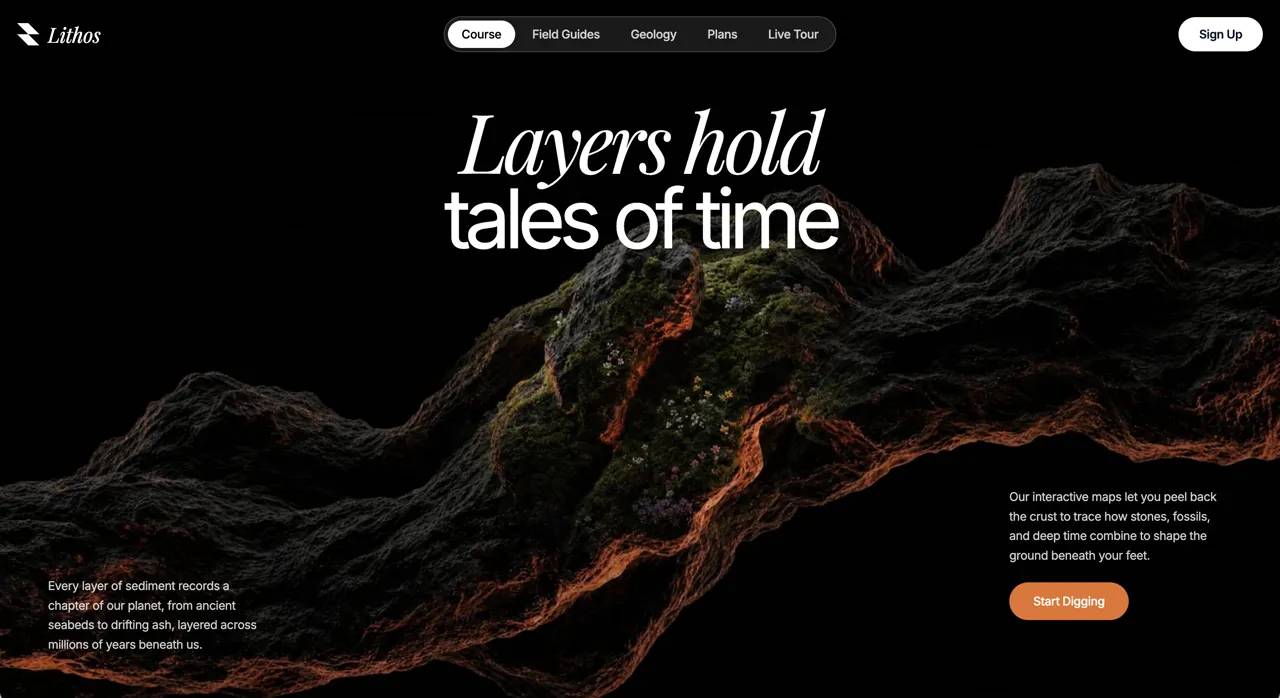
پرامپت هیرو سکشن افکت اسپاتلایت؛ نوری که با حرکت موس تصویر دوم را آشکار میکند
قیمت
رایگان
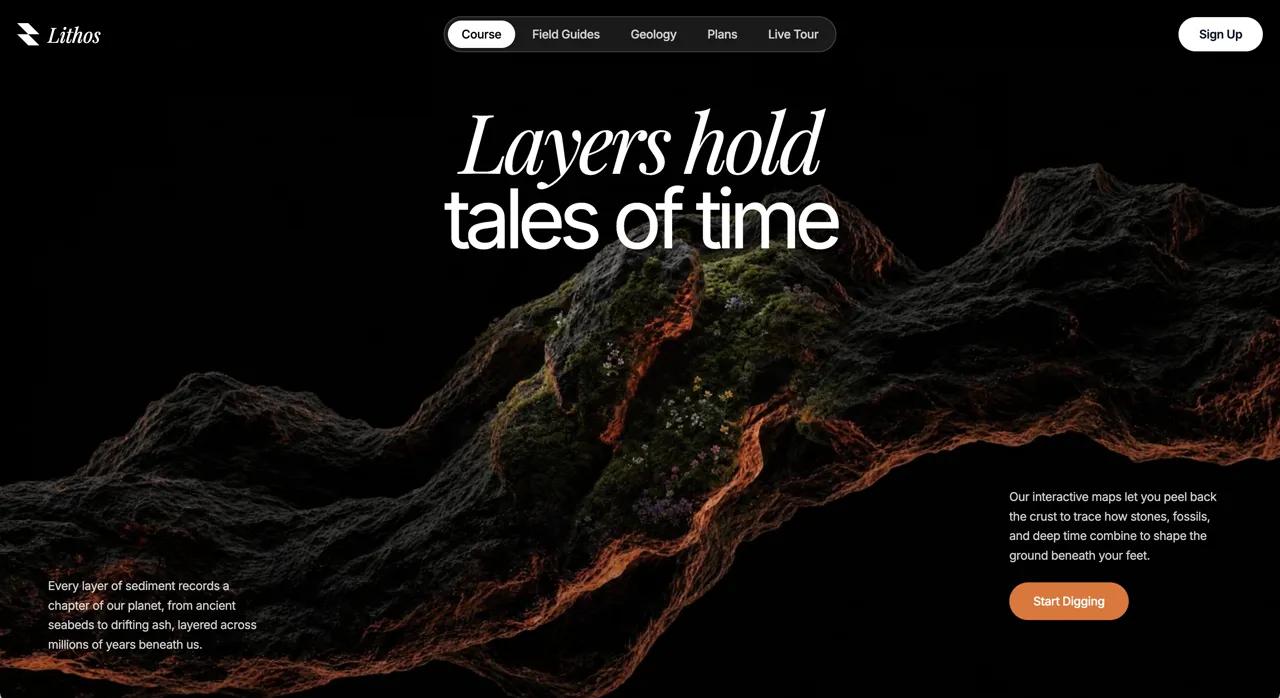
با این پرامپت هیرو سکشن افکت اسپاتلایت یک هیرو سکشن تیره که با حرکت نشانگر موس، دایرهای نرم از نور تصویر دوم را زیر تصویر اصلی نمایان میکند بسازید. پرامپت کامل را در v0، Lovable، Bolt یا Cursor بچسبانید و خروجی آماده بگیرید.
پرامپت هیرو سکشن افکت اسپاتلایت چه میسازد؟
این پرامپت هیرو سکشن افکت اسپاتلایت یک هیرو سکشن تیره که با حرکت نشانگر موس، دایرهای نرم از نور تصویر دوم را زیر تصویر اصلی نمایان میکند میسازد. نمونه داخل پرامپت برای برندی به نام «Lithos» نوشته شده و با React 18 + TypeScript + Vite + Tailwind CSS + lucide-react ساخته میشود. چون همه جزئیات (فونت، رنگ، فاصلهها و انیمیشنها) دقیق نوشته شده، خروجی ابزارهای هوش مصنوعی تا حد زیادی شبیه پیشنمایش بالای صفحه میشود.
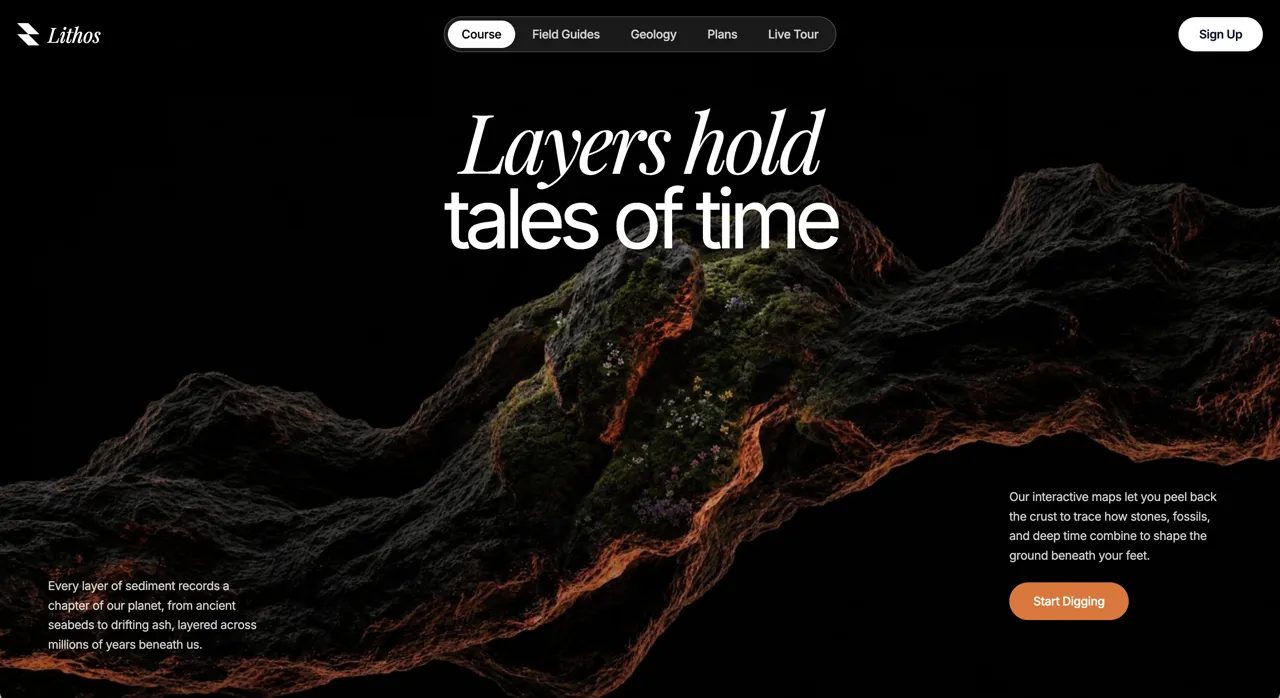
- ماسک دایرهای نرم که دنبال نشانگر موس حرکت میکند
- دو لایه تصویر روی هم برای افکت reveal
- فونتها و رنگهای دقیق برای برند معدن و زمینشناسی
روش استفاده در v0، Lovable، Bolt و Cursor
- متن کامل پرامپت انگلیسی را کپی کنید؛ چیزی از آن را حذف نکنید.
- در v0، Lovable یا Bolt یک پروژه تازه بسازید و پرامپت را بچسبانید. در Cursor یا Claude Code، اول یک پروژه خالی Vite بسازید و بعد پرامپت را به ایجنت بدهید.
- نسخه اول را ببینید و فقط یک تغییر در هر پیام بخواهید؛ مثلاً «اسم برند را عوض کن» یا «رنگ دکمه را سبز کن».
- لینک ویدیو یا تصویر نمونه را با رسانه خودتان جایگزین کنید و نسخه موبایل را هم بررسی کنید.
نکتههای شخصیسازی
برای سایت فارسی، بعد از ساخت از ابزار بخواهید صفحه را راستچین کند و فونت Vazirmatn را جایگزین کند. تیتر و متن دکمهها را کوتاه نگه دارید تا چیدمان به هم نریزد. اگر ویدیوی پسزمینه سنگین است، آن را زیر ۳ مگابایت و با فرمت mp4 (H.264) فشرده کنید و یک تصویر پوستر هم بگذارید.
سوالات متداول
پرامپت هیرو سکشن افکت اسپاتلایت را در کدام ابزار استفاده کنم؟
این پرامپت برای ابزارهای ساخت سایت با هوش مصنوعی مثل v0، Lovable، Bolt، Cursor و Claude نوشته شده است. متن کامل را در یک گفتگوی تازه بچسبانید تا هیرو سکشن با React 18 + TypeScript + Vite + Tailwind CSS + lucide-react ساخته شود.
آیا میتوانم متنها را فارسی و راستچین کنم؟
بله. بعد از ساخت نسخه اول، از ابزار بخواهید dir="rtl" را روی html بگذارد، فونت را به Vazirmatn تغییر دهد و متنها را با محتوای برند شما جایگزین کند.
ویدیو یا تصویر داخل پرامپت را میتوانم استفاده کنم؟
لینکهای رسانه داخل پرامپت فقط برای نمونه هستند و مجوز MIT پرامپت شامل آنها نمیشود. برای سایت واقعی، ویدیو یا تصویر خودتان را جایگزین لینک کنید.
استفاده تجاری از این پرامپت آزاد است؟
متن پرامپت با مجوز MIT منتشر شده و استفاده، تغییر و استفاده تجاری آن آزاد است؛ فقط نام منبع (DexZane/awesome-web-prompts) را حفظ کنید.
پرامپتها و دستههای مرتبط
- پرامپت هیرو سکشن: همه پرامپتهای هیرو سکشن و لندینگ پیج
- پرامپت هیرو سکشن آژانس خلاق
- پرامپت وایب کدنویسی
- پرامپت طراحی وب
Prompt from DexZane/awesome-web-prompts (MIT License, © 2026 DexZane)
برای دیدن پرامپتهای بیشتر در همه دستهها به آرشیو پرامپت آماده سر بزنید.
```
Build a full-screen, dark-themed hero section for a geology brand called **Lithos**, using **React 18 + TypeScript + Vite + Tailwind CSS** and **lucide-react** for icons. The signature feature is a **cursor-following spotlight that reveals a second image** through a soft circular mask on top of a base image. Match every detail below exactly.

### Fonts
Add this to the top of `src/index.css`, then `@tailwind base/components/utilities`:
```css
@import url('https://fonts.googleapis.com/css2?family=Inter:wght@300;400;500;600;700&family=Playfair+Display:ital,wght@1,400;1,500;1,600&display=swap');
* { font-family: 'Inter', sans-serif; }
.font-playfair { font-family: 'Playfair Display', serif; }
```
- Body/UI font: **Inter**.
- Display/wordmark accent: **Playfair Display, italic**.

### Asset URLs (use these exactly)
- Base image (`BG_IMAGE_1`):
  `https://images.higgs.ai/?default=1&output=webp&url=https%3A%2F%2Fd8j0ntlcm91z4.cloudfront.net%2Fuser_38xzZboKViGWJOttwIXH07lWA1P%2Fhf_20260609_195923_b0ba8ace-1d1d-4f2c-9a28-1ab84b330680.png&w=1280&q=85`
- Reveal image (`BG_IMAGE_2`):
  `https://images.higgs.ai/?default=1&output=webp&url=https%3A%2F%2Fd8j0ntlcm91z4.cloudfront.net%2Fuser_38xzZboKViGWJOttwIXH07lWA1P%2Fhf_20260609_201152_bba90a12-bf12-459f-91f0-51f237dbaf3b.png&w=1280&q=85`

### Layout & structure
Root wrapper: `min-h-screen bg-white tracking-[-0.02em]`, inline `fontFamily: "'Inter', sans-serif"`.

**Section** (`<section>`): `relative w-full overflow-hidden h-screen bg-black`, inline `style={{ height: '100dvh' }}`. Layers, by z-index:
1. **Base image** (`z-10`): `absolute inset-0 bg-center bg-cover bg-no-repeat`, background = `BG_IMAGE_1`.
2. **Reveal layer** (`z-30`): a `RevealLayer` component (see below) showing `BG_IMAGE_2`.
3. **Heading** (`z-50`): `absolute top-[14%] left-0 right-0 flex flex-col items-center text-center px-5 pointer-events-none`. An `<h1>` with `text-white leading-[0.95]` containing two block spans:
   - Line 1: `block font-playfair italic font-normal text-5xl sm:text-7xl md:text-8xl`, inline `letterSpacing: '-0.05em'`, text **"Layers hold"**.
   - Line 2: `block font-normal text-5xl sm:text-7xl md:text-8xl -mt-1`, inline `letterSpacing: '-0.08em'`, text **"tales of time"**.
4. **Bottom-left paragraph** (`z-50`): `hidden sm:block absolute bottom-14 left-10 md:left-14 max-w-[260px]`. `<p className="text-sm text-white/80 leading-relaxed">` — "Every layer of sediment records a chapter of our planet, from ancient seabeds to drifting ash, layered across millions of years beneath us."
5. **Bottom-right block** (`z-50`): `absolute bottom-10 sm:bottom-24 left-5 right-5 sm:left-auto sm:right-10 md:right-14 max-w-full sm:max-w-[260px] flex flex-col items-start gap-4 sm:gap-5`. Contains a `<p className="text-xs sm:text-sm text-white/80 leading-relaxed">` — "Our interactive maps let you peel back the crust to trace how stones, fossils, and deep time combine to shape the ground beneath your feet." — and a **Start Digging** button: `bg-[#e8702a] hover:bg-[#d2611f] text-white text-sm font-medium px-7 py-3 rounded-full transition-all hover:scale-[1.03] active:scale-95 hover:shadow-lg hover:shadow-[#e8702a]/30`.

### The cursor spotlight reveal (core mechanic)
In the parent, define `const SPOTLIGHT_R = 260;` and track the mouse with smoothing:
- Refs: `mouse` (raw), `smooth` (eased), `rafRef`; state `cursorPos` (init `{x:-999,y:-999}`).
- `mousemove` listener stores raw `e.clientX/clientY`.
- A `requestAnimationFrame` loop lerps: `smooth.x += (mouse.x - smooth.x) * 0.1` (same for y), then `setCursorPos`. Clean up listener + cancel RAF on unmount.

`RevealLayer({ image, cursorX, cursorY })`:
- Holds a hidden `<canvas>` (`absolute inset-0 pointer-events-none`, `style={{display:'none'}}`) sized to `window.innerWidth/Height` on mount + resize.
- A reveal `<div>` (`absolute inset-0 bg-center bg-cover bg-no-repeat z-30 pointer-events-none`) with the reveal image as background.
- On every render: clear canvas, build a **radial gradient** at `(cursorX, cursorY)` from radius 0 → `SPOTLIGHT_R` with stops:
  `0 → rgba(255,255,255,1)`, `0.4 → 1`, `0.6 → 0.75`, `0.75 → 0.4`, `0.88 → 0.12`, `1 → 0`.
  Fill an arc of radius `SPOTLIGHT_R` with it. Then `canvas.toDataURL()` and apply it as `maskImage`/`webkitMaskImage` on the reveal div with `maskSize: '100% 100%'`. This makes the second image visible only inside the soft glowing circle that trails the cursor.

### Navigation (fixed, over hero)
`<nav className="fixed top-0 left-0 right-0 z-[100] flex items-center justify-between p-4 sm:p-5">`:
- **Left**: an inline SVG logo (26×26, viewBox `0 0 256 256`, `fill="#ffffff"`, path `M 256 256 L 128 256 L 0 128 L 128 128 Z M 256 128 L 128 128 L 0 0 L 128 0 Z`) + wordmark `<span className="text-white text-2xl font-playfair italic">Lithos</span>`.
- **Center pill** (`hidden md:flex absolute left-1/2 -translate-x-1/2 bg-white/20 backdrop-blur-md border border-white/30 rounded-full px-2 py-2 items-center gap-1`): buttons **Course** (active: full white text), then **Field Guides, Geology, Plans, Live Tour** (`text-white/80 ... hover:bg-white/20 hover:text-white transition-colors`, `px-4 py-1.5 rounded-full text-sm font-medium`).
- **Right (desktop)**: `hidden md:block bg-white text-gray-900 text-sm font-semibold px-6 py-2.5 rounded-full hover:bg-gray-100` — **Sign Up**.

### Animations (premium, on load)
Add to `index.css`:
```css
@keyframes heroReveal { 0%{opacity:0;transform:translateY(28px);filter:blur(12px)} 100%{opacity:1;transform:translateY(0);filter:blur(0)} }
@keyframes heroFadeUp { 0%{opacity:0;transform:translateY(20px)} 100%{opacity:1;transform:translateY(0)} }
@keyframes heroZoom { 0%{transform:scale(1.12)} 100%{transform:scale(1)} }
.hero-anim { opacity:0; animation-fill-mode:forwards; animation-timing-function:cubic-bezier(0.16,1,0.3,1); }
.hero-reveal { animation-name:heroReveal; animation-duration:1.1s; }
.hero-fade { animation-name:heroFadeUp; animation-duration:1s; }
.hero-zoom { animation:heroZoom 1.8s cubic-bezier(0.16,1,0.3,1) forwards; }
@media (prefers-reduced-motion: reduce){ .hero-anim,.hero-zoom{ animation:none; opacity:1; } }
```
Apply:
- Base image div → add `hero-zoom` (slow Ken Burns zoom-out).
- Heading line 1 → `hero-anim hero-reveal`, inline `animationDelay: '0.25s'`; line 2 → same with `'0.42s'` (blur-rise, staggered).
- Bottom-left paragraph wrapper → `hero-anim hero-fade`, `animationDelay: '0.7s'`.
- Bottom-right wrapper → `hero-anim hero-fade`, `animationDelay: '0.85s'`.

### Responsiveness
- Heading scales `text-5xl` → `sm:text-7xl` → `md:text-8xl`.
- Center nav pill and desktop Sign Up are `hidden` below `md`; the mobile hamburger is `md:hidden`.
- Bottom-left paragraph is `hidden sm:block`; bottom-right block is full-width on mobile (`left-5 right-5`) and right-anchored from `sm`.
- Use `100dvh` so mobile browser chrome doesn't clip the section.
```پرامپتهای مرتبط
مقالات مرتبط
مهندسی پرامپت
شخصیسازی پرامپت آماده؛ راهنمای گامبهگام برای گرفتن جواب حرفهای
پرامپت آماده فقط نقطه شروع است. در این راهنما یاد میگیرید با پنج لایه شخصیسازی، قالبهای عمومی را به پرامپتهایی تبدیل کنید که خروجی مخصوص کسبوکار شما میدهند.
۱۴۰۵/۸/۱۴
توسعه و برنامهنویسی
مدلهای هوش مصنوعی چینی ۲۰۲۶؛ Kimi K3، GLM-5.3، Wan3.0 و MiniMax H3
مرور تازهترین مدلهای هوش مصنوعی چینی بر اساس صفحات رسمی: Kimi K3 و K2.8 Preview، GLM-5.3، Wan3.0 و MiniMax H3؛ و اینکه برای کاربر ایرانی چه معنایی دارند.
۱۴۰۵/۸/۱۳
توسعه و برنامهنویسی
کلود اپوس ۵.۵؛ قویترین مدل Anthropic برای برنامهنویسی و پروژههای بزرگ
Anthropic در ۲۲ سپتامبر ۲۰۲۶ Claude Opus 5.5 را با عملکرد پیشرو در کدنویسی ایجنتی و ۴۰ درصد هزینه کمتر از Opus 5 معرفی کرد. راهنمای کامل برای برنامهنویسان.
۱۴۰۵/۸/۱۲
مهندسی پرامپت
ابزار هوش مصنوعی رایگان برای فارسیزبانها در ۲۰۲۶؛ چه چیزی واقعاً رایگان است؟
کدام ابزار هوش مصنوعی رایگان واقعاً به درد کار روزمره میخورد؟ راهنمای پلنهای رایگان ChatGPT، Claude و DeepSeek، مدلهای متنباز و ۷ ترفند برای استفاده بهتر.
۱۴۰۵/۸/۱۱
امتیاز و نظرات
— · 0 امتیاز
امتیاز شما