
پرامپت هیرو سکشن شوکیس استودیو؛ اسپلش و منوی تمامصفحه در یک فایل HTML
قیمت
رایگان
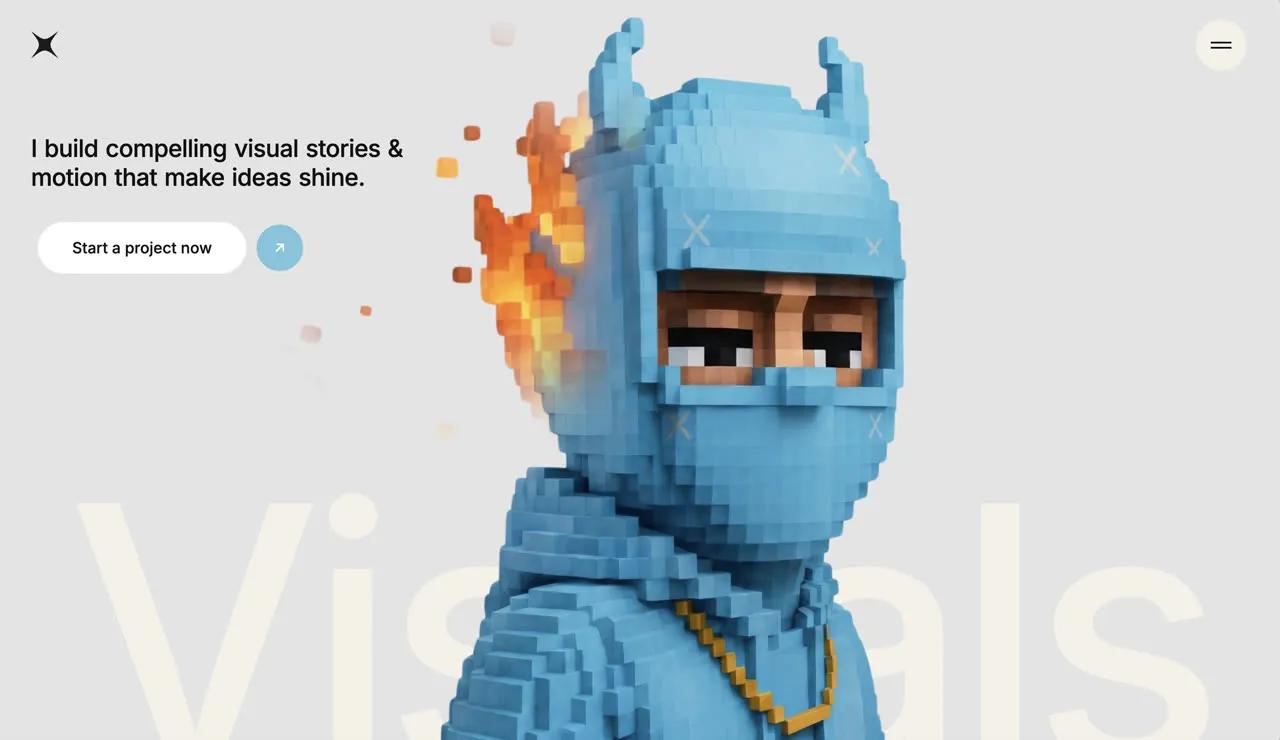
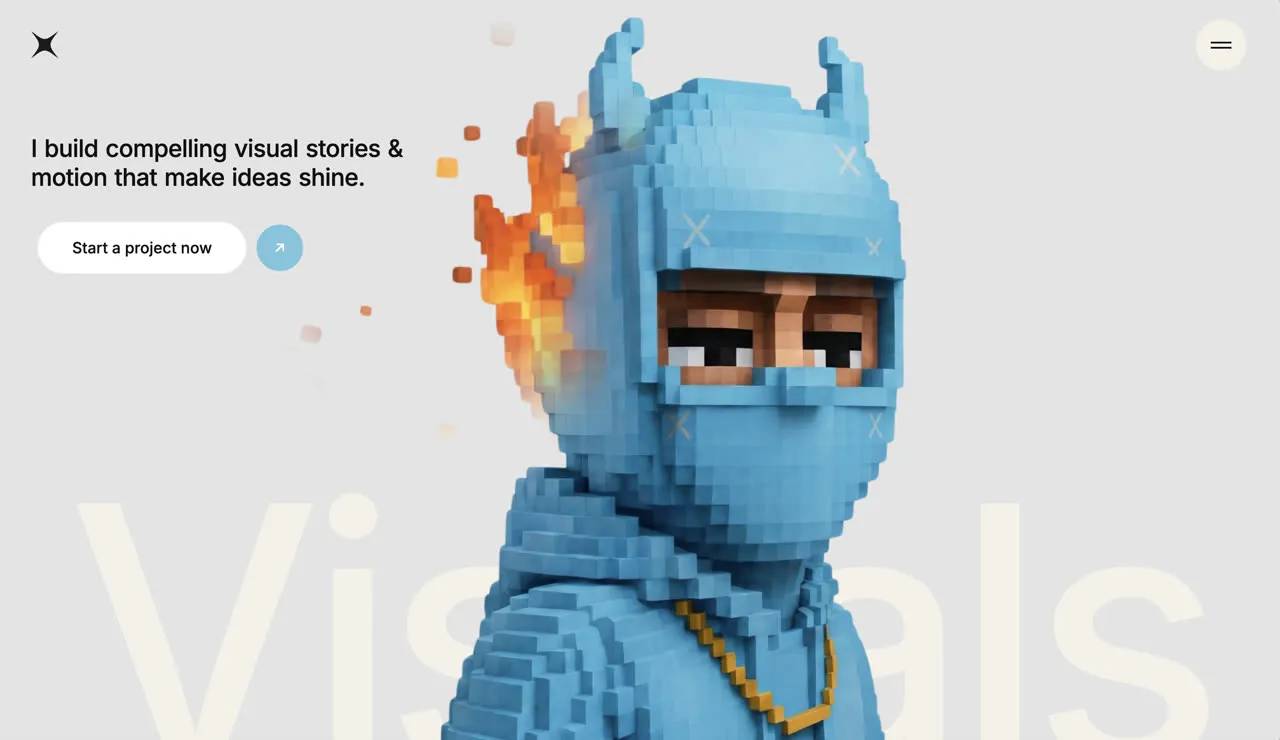
با این پرامپت هیرو سکشن شوکیس استودیو یک صفحه کامل HTML برای معرفی استودیو یا طراح با اسپلش اسکرین متحرک، منوی تمامصفحه و نمایش کارها بسازید. پرامپت کامل را در v0، Lovable، Bolt یا Cursor بچسبانید و خروجی آماده بگیرید.
پرامپت هیرو سکشن شوکیس استودیو چه میسازد؟
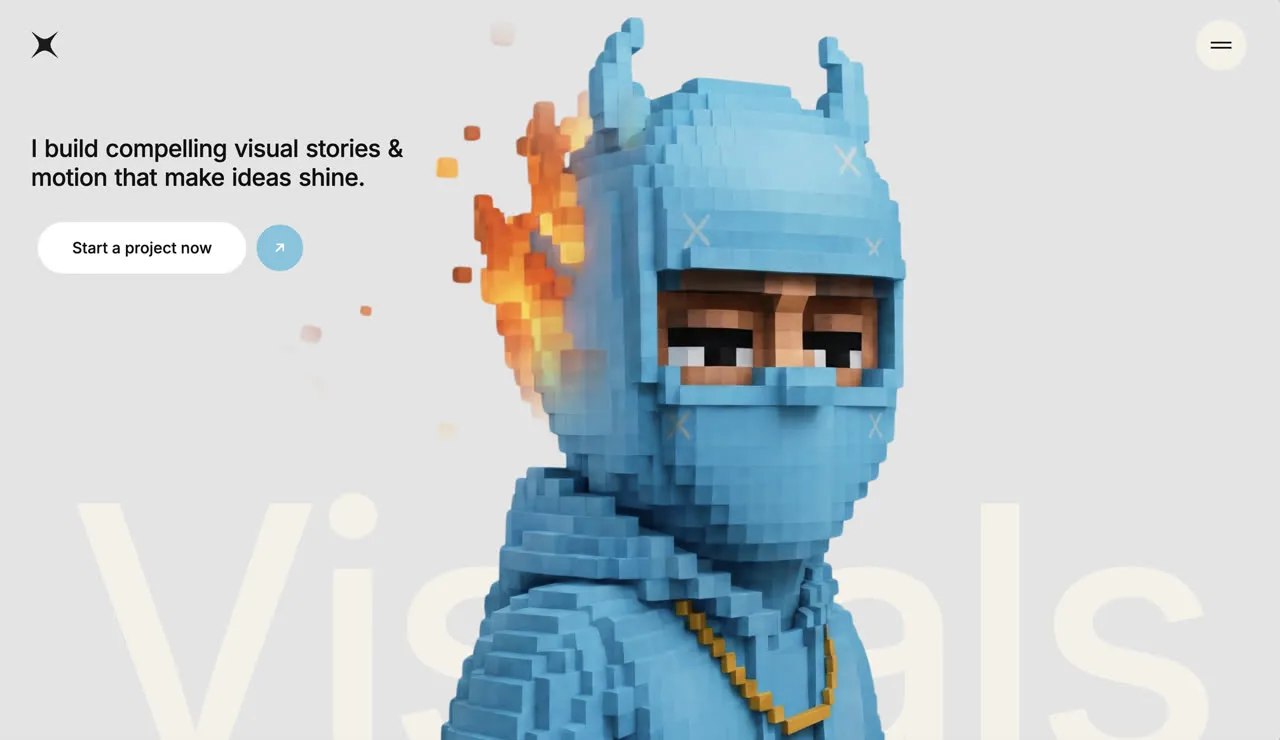
این پرامپت هیرو سکشن شوکیس استودیو یک صفحه کامل HTML برای معرفی استودیو یا طراح با اسپلش اسکرین متحرک، منوی تمامصفحه و نمایش کارها میسازد. نمونه داخل پرامپت برای برندی به نام «Creative Studio Showcase» نوشته شده و با HTML + CSS + JavaScript (یک فایل) ساخته میشود. چون همه جزئیات (فونت، رنگ، فاصلهها و انیمیشنها) دقیق نوشته شده، خروجی ابزارهای هوش مصنوعی تا حد زیادی شبیه پیشنمایش بالای صفحه میشود.
- کد کامل HTML آماده؛ فقط ذخیره و باز کنید
- اسپلش اسکرین متحرک در ابتدای ورود
- منوی تمامصفحه با ایمیل تماس
روش استفاده در v0، Lovable، Bolt و Cursor
- متن کامل پرامپت انگلیسی را کپی کنید؛ چیزی از آن را حذف نکنید.
- در v0، Lovable یا Bolt یک پروژه تازه بسازید و پرامپت را بچسبانید. در Cursor یا Claude Code، اول یک پروژه خالی Vite بسازید و بعد پرامپت را به ایجنت بدهید.
- نسخه اول را ببینید و فقط یک تغییر در هر پیام بخواهید؛ مثلاً «اسم برند را عوض کن» یا «رنگ دکمه را سبز کن».
- لینک ویدیو یا تصویر نمونه را با رسانه خودتان جایگزین کنید و نسخه موبایل را هم بررسی کنید.
نکتههای شخصیسازی
برای سایت فارسی، بعد از ساخت از ابزار بخواهید صفحه را راستچین کند و فونت Vazirmatn را جایگزین کند. تیتر و متن دکمهها را کوتاه نگه دارید تا چیدمان به هم نریزد. اگر ویدیوی پسزمینه سنگین است، آن را زیر ۳ مگابایت و با فرمت mp4 (H.264) فشرده کنید و یک تصویر پوستر هم بگذارید.
سوالات متداول
پرامپت هیرو سکشن شوکیس استودیو را در کدام ابزار استفاده کنم؟
این پرامپت برای ابزارهای ساخت سایت با هوش مصنوعی مثل v0، Lovable، Bolt، Cursor و Claude نوشته شده است. متن کامل را در یک گفتگوی تازه بچسبانید تا هیرو سکشن با HTML + CSS + JavaScript (یک فایل) ساخته شود.
آیا میتوانم متنها را فارسی و راستچین کنم؟
بله. بعد از ساخت نسخه اول، از ابزار بخواهید dir="rtl" را روی html بگذارد، فونت را به Vazirmatn تغییر دهد و متنها را با محتوای برند شما جایگزین کند.
ویدیو یا تصویر داخل پرامپت را میتوانم استفاده کنم؟
لینکهای رسانه داخل پرامپت فقط برای نمونه هستند و مجوز MIT پرامپت شامل آنها نمیشود. برای سایت واقعی، ویدیو یا تصویر خودتان را جایگزین لینک کنید.
استفاده تجاری از این پرامپت آزاد است؟
متن پرامپت با مجوز MIT منتشر شده و استفاده، تغییر و استفاده تجاری آن آزاد است؛ فقط نام منبع (DexZane/awesome-web-prompts) را حفظ کنید.
پرامپتها و دستههای مرتبط
- پرامپت هیرو سکشن: همه پرامپتهای هیرو سکشن و لندینگ پیج
- پرامپت هیرو سکشن انیمیشن متن
- پرامپت هیرو سکشن اپلیکیشن مدیتیشن
- پرامپت وایب کدنویسی
- پرامپت طراحی وب
Prompt from DexZane/awesome-web-prompts (MIT License, © 2026 DexZane)
برای دیدن پرامپتهای بیشتر در همه دستهها به آرشیو پرامپت آماده سر بزنید.
Save the complete HTML below as an `.html` file and open it in a browser.

```html
<!DOCTYPE html>
<html lang="en">
<head>
<meta charset="UTF-8"/>
<meta name="viewport" content="width=device-width, initial-scale=1.0"/>
<title>Creative Studio Showcase</title>
<link rel="preconnect" href="https://fonts.googleapis.com"/>
<link rel="preconnect" href="https://fonts.gstatic.com" crossorigin/>
<link href="https://fonts.googleapis.com/css2?family=Inter:wght@300;400;500;600;700&display=swap" rel="stylesheet"/>
<style>
*, *::before, *::after { box-sizing: border-box; margin: 0; padding: 0; }
* { font-family: 'Inter', system-ui, -apple-system, BlinkMacSystemFont, "Segoe UI", sans-serif; }

html, body {
  margin: 0; padding: 0;
  background: #E4E4E4;
  color: #F4F1E8;
  overflow-x: hidden;
  scroll-behavior: smooth;
}

/* ===== SPLASH ===== */
.splash {
  position: fixed; inset: 0;
  width: 100vw; height: 100vh;
  z-index: 9999;
  pointer-events: none;
  overflow: hidden;
  animation: splashHide 0.3s ease forwards;
  animation-delay: 1.35s;
}
.splash-row { display: flex; width: 100%; height: 50%; }
.splash-box { width: 20%; height: 100%; background: #75C5DE; }
.splash-row-top .splash-box { animation: splashTop 1s cubic-bezier(0.96,-0.02,0.38,1.01) forwards; }
.splash-row-bottom .splash-box { animation: splashBottom 1s cubic-bezier(0.96,-0.02,0.38,1.01) forwards; }
.splash-box:nth-child(1) { animation-delay: 0s; }
.splash-box:nth-child(2) { animation-delay: 0.05s; }
.splash-box:nth-child(3) { animation-delay: 0.1s; }
.splash-box:nth-child(4) { animation-delay: 0.15s; }
.splash-box:nth-child(5) { animation-delay: 0.2s; }

@keyframes splashTop { from { transform: translateY(0%); } to { transform: translateY(-100%); } }
@keyframes splashBottom { from { transform: translateY(0%); } to { transform: translateY(100%); } }
@keyframes splashHide { to { opacity: 0; visibility: hidden; } }

/* ===== HERO IMAGE ENTRANCE ===== */
@keyframes heroImageIn {
  from { opacity: 0; transform: scale(1.5) rotate(3deg); }
  to { opacity: 1; transform: scale(1) rotate(0deg); }
}
.hero-image-animate {
  animation: heroImageIn 1.2s cubic-bezier(0.25,0.46,0.45,0.94) forwards;
  animation-delay: 1s;
  opacity: 0;
}

/* ===== WORD REVEAL ===== */
@keyframes wordReveal {
  from { opacity: 0; transform: translateY(10px); filter: blur(10px); }
  to { opacity: 1; transform: translateY(0); filter: blur(0); }
}
.word-reveal {
  opacity: 0;
  display: inline-block;
  margin-right: 0.3em;
  animation: wordReveal 0.4s ease forwards;
}

/* ===== CTA ENTRANCE ===== */
@keyframes slideUpScale {
  from { opacity: 0; transform: translateY(60px) scale(0.4); }
  to { opacity: 1; transform: translateY(0) scale(1); }
}
.cta-animate {
  opacity: 0;
  animation: slideUpScale 0.8s cubic-bezier(0.25,0.46,0.45,0.94) forwards;
  animation-delay: 1s;
}

/* ===== CTA BUTTON ===== */
.cta-btn { position: relative; overflow: hidden; display: flex; align-items: center; border: none; background: none; cursor: pointer; border-radius: 9999px; padding: 8px; gap: 12px; }
.cta-btn-bg {
  position: absolute; top: 5px; bottom: 5px; left: 8px;
  width: calc(100% - 8px - 8px - 48px - 12px);
  border-radius: 9999px; background: white; z-index: 0;
  transition: width 0.4s cubic-bezier(0.25,0.46,0.45,0.94);
}
@media (min-width: 768px) { .cta-btn-bg { width: calc(100% - 8px - 8px - 54px - 12px); } }
.cta-btn:hover .cta-btn-bg { width: calc(100% - 16px); }
.cta-btn-text { position: relative; z-index: 1; color: #111111; font-weight: 500; font-size: 16px; padding: 12px 32px; white-space: nowrap; }
@media (min-width: 768px) { .cta-btn-text { font-size: 18px; padding: 16px 40px; } }
.cta-btn-circle {
  position: relative; z-index: 1; display: flex; align-items: center; justify-content: center;
  width: 48px; height: 48px; border-radius: 50%; background: #75C5DE; flex-shrink: 0;
  transition: transform 0.4s cubic-bezier(0.25,0.46,0.45,0.94);
}
@media (min-width: 768px) { .cta-btn-circle { width: 54px; height: 54px; } }
.cta-btn:hover .cta-btn-circle { transform: translateX(-7px); }

/* ===== MENU CTA (smaller) ===== */
.menu-cta-btn { position: relative; overflow: hidden; display: flex; align-items: center; border: none; background: none; cursor: pointer; border-radius: 9999px; padding: 6px; gap: 8px; }
.menu-cta-bg {
  position: absolute; top: 5px; bottom: 5px; left: 8px;
  width: calc(100% - 8px - 8px - 38px - 8px);
  border-radius: 9999px; background: white; z-index: 0;
  transition: width 0.4s cubic-bezier(0.25,0.46,0.45,0.94);
}
.menu-cta-btn:hover .menu-cta-bg { width: calc(100% - 12px); }
.menu-cta-text { position: relative; z-index: 1; color: #111111; font-weight: 500; font-size: 14px; padding: 8px 40px; white-space: nowrap; }
.menu-cta-circle {
  position: relative; z-index: 1; display: flex; align-items: center; justify-content: center;
  width: 38px; height: 38px; border-radius: 50%; background: #75C5DE; flex-shrink: 0;
  transition: transform 0.3s ease;
}
.menu-cta-btn:hover .menu-cta-circle { transform: translateX(-4px); }

/* ===== CREATOR TEXT ===== */
@keyframes creatorSlideUp { from { transform: translateY(330px); } to { transform: translateY(0); } }
.creator-text-animate {
  transform: translateY(330px);
  animation: creatorSlideUp 1s cubic-bezier(0.16,1,0.3,1) forwards;
  animation-delay: 1.5s;
}

/* ===== NAVIGATION ===== */
.logo-wrapper {
  position: fixed; top: 30px; left: 0; width: 50%; z-index: 10;
  display: flex; justify-content: flex-start; align-items: center; mix-blend-mode: difference;
}
@media (min-width: 768px) { .logo-wrapper { top: 40px; } }
.logo-wrapper .inner { padding-left: 20px; }
@media (min-width: 768px) { .logo-wrapper .inner { padding-left: 40px; } }
.logo-wrapper img { width: 32px; height: 32px; }

.burger-wrapper {
  position: fixed; top: 16px; right: 0; width: 50%; z-index: 10;
  display: flex; justify-content: flex-end; align-items: center;
}
@media (min-width: 768px) { .burger-wrapper { top: 27px; } }
.burger-wrapper .inner { padding-right: 20px; }
@media (min-width: 768px) { .burger-wrapper .inner { padding-right: 40px; } }

.burger-btn {
  width: 59px; height: 59px; border-radius: 50%; border: none; cursor: pointer;
  display: flex; flex-direction: column; gap: 4px; align-items: center; justify-content: center;
  background: #F4F1E8; transition: background 0.4s ease;
}
.burger-btn:hover { background: #0B0B0B; }
.burger-btn .bar {
  display: block; width: 24px; height: 2px; background: #111111;
  transition: all 0.3s ease;
}
.burger-btn:hover .bar { background: #F4F1E8; }
.burger-btn.open { background: #0B0B0B; }
.burger-btn.open .bar { background: #F4F1E8; }
.burger-btn.open .bar:first-child { transform: rotate(45deg) translate(2px, 2px); }
.burger-btn.open .bar:last-child { transform: rotate(-45deg) translate(2px, -2px); }

/* ===== MENU PANEL ===== */
.menu-panel {
  position: fixed; z-index: 9;
  left: 8px; right: 8px;
  border-radius: 20px;
  background: rgba(17,17,17,0.95);
  backdrop-filter: blur(26px); -webkit-backdrop-filter: blur(26px);
  padding: 90px 32px 32px 32px;
  display: flex; flex-direction: column; justify-content: space-between;
  transition: top 0.5s cubic-bezier(0.25,0.46,0.45,0.94), opacity 0.4s ease;
  top: -600px; opacity: 0; pointer-events: none;
}
@media (min-width: 768px) {
  .menu-panel { left: auto; right: 7px; width: 420px; padding: 60px; }
}
.menu-panel.open { top: 0; opacity: 1; pointer-events: auto; }
@media (min-width: 768px) { .menu-panel.open { top: 7px; } }

.menu-panel nav { display: flex; flex-direction: column; gap: 8px; }
.menu-panel nav a {
  color: #F4F1E8; font-size: 36px; font-weight: 500; text-decoration: none;
  line-height: 130%; transition: opacity 0.3s ease;
}
@media (min-width: 768px) { .menu-panel nav a { font-size: 42px; } }
.menu-panel nav a:hover { opacity: 0.7; }

.menu-contact { display: flex; flex-direction: column; gap: 20px; margin-top: 32px; }
.menu-email { color: #9A9590; font-size: 18px; text-decoration: none; transition: color 0.3s ease; }
@media (min-width: 768px) { .menu-email { font-size: 20px; } }
.menu-email:hover { color: #F4F1E8; }
.menu-socials { display: flex; gap: 24px; }
.menu-socials a {
  color: #9A9590; font-size: 14px; text-decoration: underline;
  text-underline-offset: 2px; transition: color 0.3s ease;
}
.menu-socials a:hover { color: #F4F1E8; }

/* ===== HERO ===== */
.hero {
  position: relative; width: 100%; overflow: hidden;
  background: #E4E4E4; min-height: 100vh;
}
@media (min-width: 768px) { .hero { height: 100vh; min-height: 800px; } }

.hero-big-text {
  position: absolute; bottom: -30px; left: 0; right: 0; z-index: 2;
  pointer-events: none; width: 100%; text-align: center;
}
@media (min-width: 768px) { .hero-big-text { bottom: -40px; } }
.hero-big-text h2 {
  font-weight: 500; color: #F4F1E8; line-height: 80%;
  letter-spacing: -0.04em; white-space: nowrap;
  font-size: clamp(180px, 28vw, 560px);
}

.hero-base-img {
  position: absolute; top: 30vh; left: 0; right: 0; bottom: 0;
  background-size: cover; background-repeat: no-repeat;
  background-position: 60% center; z-index: 5;
}
@media (min-width: 768px) { .hero-base-img { top: 0; background-position: center; } }

.hero-reveal-img {
  position: absolute; top: 30vh; left: 0; right: 0; bottom: 0;
  background-size: cover; background-repeat: no-repeat;
  background-position: 60% center; z-index: 7; pointer-events: none;
}
@media (min-width: 768px) { .hero-reveal-img { top: 0; background-position: center; } }

.hero-content {
  position: relative; z-index: 8;
  display: flex; flex-direction: column; justify-content: flex-start; align-items: flex-start;
  width: 100%; max-width: 1600px; margin: 0 auto;
  padding: 110px 16px 24px 16px; pointer-events: none;
}
@media (min-width: 768px) {
  .hero-content {
    position: absolute; inset: 0;
    justify-content: space-between;
    padding: 160px 40px 100px 40px;
  }
}
.hero-content-inner { display: flex; flex-direction: column; align-items: flex-start; gap: 30px; width: 100%; pointer-events: auto; }

.hero-headline {
  font-size: 22px; font-weight: 500; line-height: 120%;
  letter-spacing: -0.02em; color: #111111; max-width: 447px;
}
@media (min-width: 768px) { .hero-headline { font-size: 28px; } }

/* ===== CANVAS (hidden) ===== */
#reveal-canvas { display: none; position: absolute; inset: 0; pointer-events: none; }

/* ===== REDUCED MOTION ===== */
@media (prefers-reduced-motion: reduce) {
  .splash { animation: splashHide 0.01s linear forwards; }
  .splash-box { animation: none !important; }
  .hero-image-animate, .word-reveal, .cta-animate, .creator-text-animate {
    animation: none !important; opacity: 1 !important;
    transform: none !important; filter: none !important; visibility: visible !important;
  }
}
</style>
</head>
<body>

<!-- SPLASH -->
<div class="splash" id="splash">
  <div class="splash-row splash-row-top">
    <div class="splash-box"></div><div class="splash-box"></div><div class="splash-box"></div><div class="splash-box"></div><div class="splash-box"></div>
  </div>
  <div class="splash-row splash-row-bottom">
    <div class="splash-box"></div><div class="splash-box"></div><div class="splash-box"></div><div class="splash-box"></div><div class="splash-box"></div>
  </div>
</div>

<!-- LOGO -->
<div class="logo-wrapper">
  <div class="inner">
    <a href="/" aria-label="Home">
      <img src="https://framerusercontent.com/images/VMcS7YYTM5PXfXvlHc9u3hSCMM.svg" alt=""/>
    </a>
  </div>
</div>

<!-- BURGER -->
<div class="burger-wrapper">
  <div class="inner">
    <button class="burger-btn" id="burger-btn" aria-label="Open menu">
      <span class="bar"></span>
      <span class="bar"></span>
    </button>
  </div>
</div>

<!-- MENU PANEL -->
<div class="menu-panel" id="menu-panel">
  <nav>
    <a href="#work">Work</a>
    <a href="#about">About</a>
    <a href="#blog">Blog</a>
  </nav>
  <div class="menu-contact">
    <a href="mailto:studio@norakessler.com" class="menu-email">studio@norakessler.com</a>
    <div class="menu-socials">
      <a href="#">Pinterest</a>
      <a href="#">Behance</a>
      <a href="#">Letterboxd</a>
    </div>
  </div>
  <div style="margin-top:32px;">
    <button class="menu-cta-btn">
      <span class="menu-cta-bg"></span>
      <span class="menu-cta-text">Let's talk</span>
      <span class="menu-cta-circle">
        <svg width="14" height="14" viewBox="0 0 18 18" fill="none" xmlns="http://www.w3.org/2000/svg">
          <path d="M5 13L13 5M13 5H6M13 5V12" stroke="white" stroke-width="2" stroke-linecap="round" stroke-linejoin="round"/>
        </svg>
      </span>
    </button>
  </div>
</div>

<!-- HERO -->
<main class="hero">
  <!-- Big text behind image -->
  <div class="hero-big-text creator-text-animate">
    <h2>Visuals</h2>
  </div>

  <!-- Base image -->
  <div class="hero-base-img hero-image-animate"
       style="background-image:url('https://soft-zoom-63098134.figma.site/_assets/v11/5c9f982199fde1d9b85a20e5396f0fa7bacaf9a3.png?w=2560');">
  </div>

  <!-- Reveal layer -->
  <canvas id="reveal-canvas"></canvas>
  <div class="hero-reveal-img" id="reveal-img"
       style="background-image:url('https://soft-zoom-63098134.figma.site/_assets/v11/6be2165e31648955b4e071f4cf2a50bc572b9bfd.png?w=1536');">
  </div>

  <!-- Content -->
  <div class="hero-content">
    <div class="hero-content-inner">
      <h1 class="hero-headline" id="headline"></h1>
      <button class="cta-btn cta-animate">
        <span class="cta-btn-bg"></span>
        <span class="cta-btn-text">Start a project now</span>
        <span class="cta-btn-circle">
          <svg width="18" height="18" viewBox="0 0 18 18" fill="none" xmlns="http://www.w3.org/2000/svg">
            <path d="M5 13L13 5M13 5H6M13 5V12" stroke="white" stroke-width="2" stroke-linecap="round" stroke-linejoin="round"/>
          </svg>
        </span>
      </button>
    </div>
  </div>
</main>

<script>
(function() {
  // Word reveal
  const headline = document.getElementById('headline');
  const text = "I build compelling visual stories & motion that make ideas shine.";
  const words = text.split(' ');
  words.forEach(function(word, i) {
    const span = document.createElement('span');
    span.className = 'word-reveal';
    span.textContent = word;
    span.style.animationDelay = (1 + i * 0.05) + 's';
    headline.appendChild(span);
  });

  // Burger menu toggle
  const burgerBtn = document.getElementById('burger-btn');
  const menuPanel = document.getElementById('menu-panel');
  let menuOpen = false;
  burgerBtn.addEventListener('click', function() {
    menuOpen = !menuOpen;
    if (menuOpen) {
      burgerBtn.classList.add('open');
      menuPanel.classList.add('open');
      burgerBtn.setAttribute('aria-label', 'Close menu');
    } else {
      burgerBtn.classList.remove('open');
      menuPanel.classList.remove('open');
      burgerBtn.setAttribute('aria-label', 'Open menu');
    }
  });
  // Close menu on nav link click
  menuPanel.querySelectorAll('nav a').forEach(function(a) {
    a.addEventListener('click', function() {
      menuOpen = false;
      burgerBtn.classList.remove('open');
      menuPanel.classList.remove('open');
    });
  });

  // Spotlight reveal
  const SPOTLIGHT_R = 260;
  const canvas = document.getElementById('reveal-canvas');
  const imgLayer = document.getElementById('reveal-img');
  const ctx = canvas.getContext('2d');

  function resizeCanvas() {
    canvas.width = window.innerWidth;
    canvas.height = window.innerHeight;
  }
  resizeCanvas();
  window.addEventListener('resize', resizeCanvas);

  const mouse = { x: -999, y: -999 };
  const smooth = { x: -999, y: -999 };

  window.addEventListener('mousemove', function(e) {
    mouse.x = e.clientX;
    mouse.y = e.clientY;
  });

  function loop() {
    smooth.x += (mouse.x - smooth.x) * 0.1;
    smooth.y += (mouse.y - smooth.y) * 0.1;

    ctx.clearRect(0, 0, canvas.width, canvas.height);

    var grad = ctx.createRadialGradient(smooth.x, smooth.y, 0, smooth.x, smooth.y, SPOTLIGHT_R);
    grad.addColorStop(0, 'rgba(255,255,255,1)');
    grad.addColorStop(0.4, 'rgba(255,255,255,1)');
    grad.addColorStop(0.6, 'rgba(255,255,255,0.75)');
    grad.addColorStop(0.75, 'rgba(255,255,255,0.4)');
    grad.addColorStop(0.88, 'rgba(255,255,255,0.12)');
    grad.addColorStop(1, 'rgba(255,255,255,0)');

    ctx.beginPath();
    ctx.arc(smooth.x, smooth.y, SPOTLIGHT_R, 0, Math.PI * 2);
    ctx.fillStyle = grad;
    ctx.fill();

    var dataUrl = canvas.toDataURL();
    imgLayer.style.webkitMaskImage = 'url(' + dataUrl + ')';
    imgLayer.style.maskImage = 'url(' + dataUrl + ')';
    imgLayer.style.webkitMaskSize = '100% 100%';
    imgLayer.style.maskSize = '100% 100%';

    requestAnimationFrame(loop);
  }
  requestAnimationFrame(loop);
})();
</script>
</body>
</html>
```پرامپتهای مرتبط
مقالات مرتبط
مهندسی پرامپت
شخصیسازی پرامپت آماده؛ راهنمای گامبهگام برای گرفتن جواب حرفهای
پرامپت آماده فقط نقطه شروع است. در این راهنما یاد میگیرید با پنج لایه شخصیسازی، قالبهای عمومی را به پرامپتهایی تبدیل کنید که خروجی مخصوص کسبوکار شما میدهند.
۱۴۰۵/۸/۱۴
توسعه و برنامهنویسی
مدلهای هوش مصنوعی چینی ۲۰۲۶؛ Kimi K3، GLM-5.3، Wan3.0 و MiniMax H3
مرور تازهترین مدلهای هوش مصنوعی چینی بر اساس صفحات رسمی: Kimi K3 و K2.8 Preview، GLM-5.3، Wan3.0 و MiniMax H3؛ و اینکه برای کاربر ایرانی چه معنایی دارند.
۱۴۰۵/۸/۱۳
توسعه و برنامهنویسی
کلود اپوس ۵.۵؛ قویترین مدل Anthropic برای برنامهنویسی و پروژههای بزرگ
Anthropic در ۲۲ سپتامبر ۲۰۲۶ Claude Opus 5.5 را با عملکرد پیشرو در کدنویسی ایجنتی و ۴۰ درصد هزینه کمتر از Opus 5 معرفی کرد. راهنمای کامل برای برنامهنویسان.
۱۴۰۵/۸/۱۲
مهندسی پرامپت
ابزار هوش مصنوعی رایگان برای فارسیزبانها در ۲۰۲۶؛ چه چیزی واقعاً رایگان است؟
کدام ابزار هوش مصنوعی رایگان واقعاً به درد کار روزمره میخورد؟ راهنمای پلنهای رایگان ChatGPT، Claude و DeepSeek، مدلهای متنباز و ۷ ترفند برای استفاده بهتر.
۱۴۰۵/۸/۱۱
امتیاز و نظرات
— · 0 امتیاز
امتیاز شما